Internet Protocol Security
Internet Protocol Security (IPsec) on Cloud-Native Network Function (CNF) provides network-layer security for traffic flowing through BIG-IP system. IPsec ensures confidentiality, integrity, and peer authentication for data as it moves across untrusted networks.
What is IPsec?
IPsec is a set of protocols that secures Internet Protocol (IP) communications. It works at the network layer to encrypt and authenticate data packets between two endpoints, called peers. IPsec protects data by:
Encrypting packets at the source and decrypting them at the destination
Authenticating the identity of each peer before exchanging data
Verifying integrity to ensure packets have not been changed in transit
How IPsec works on CNF
CNF uses the IPsec Internet Key Exchange (IKE) stack to manage IPsec connections. The implementation separates control-plane and data-plane operations into dedicated components.
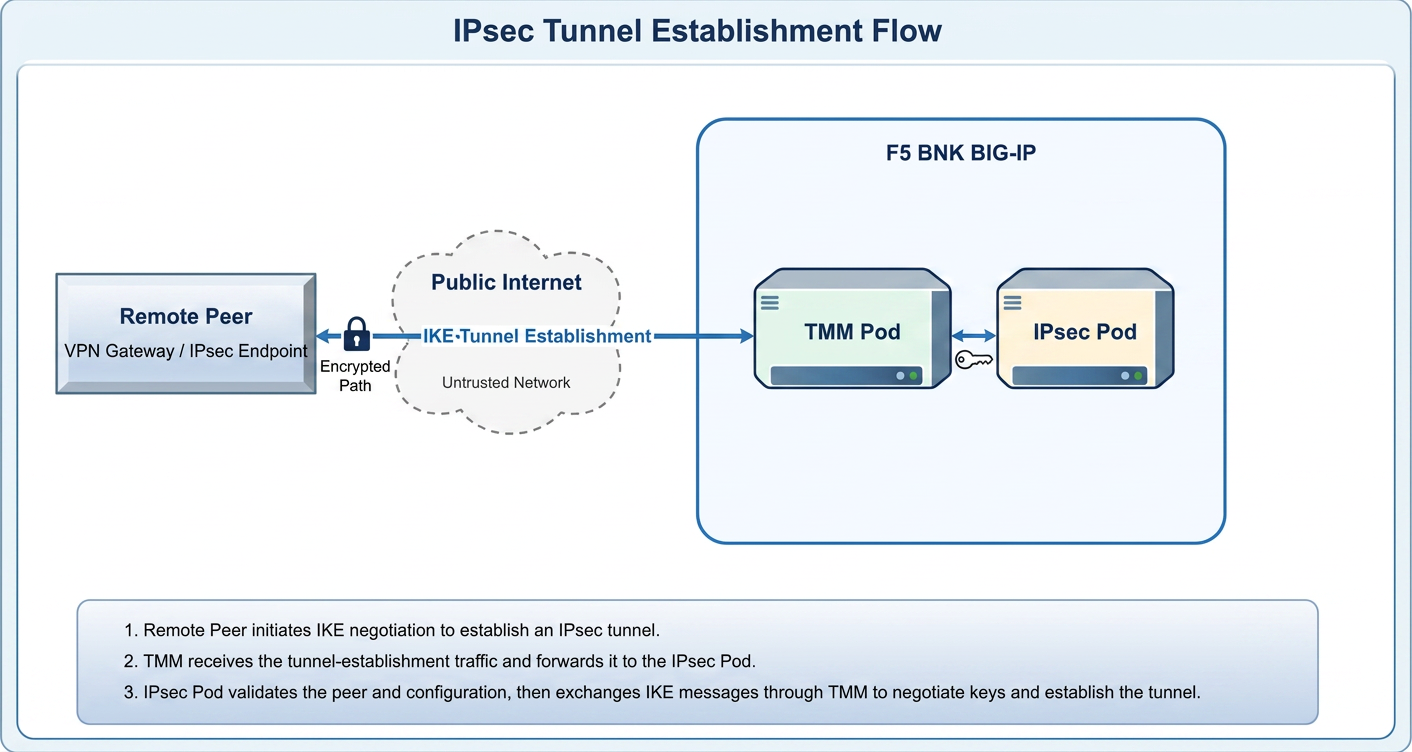
Control plane: IPsec pod
The IPsec pod manages IKE version 2 (IKEv2) negotiation through the following actions:
Negotiates IKEv2 parameters with the remote peer.
Establishes an IKE SA to create a secure control channel.
Creates IPsec SAs that define how data-plane traffic is protected.
Pushes the IPsec Security Policies (SPs) and Security Associations (SAs) to the Traffic Management Microkernel (TMM) pods.
Data plane: TMM pods
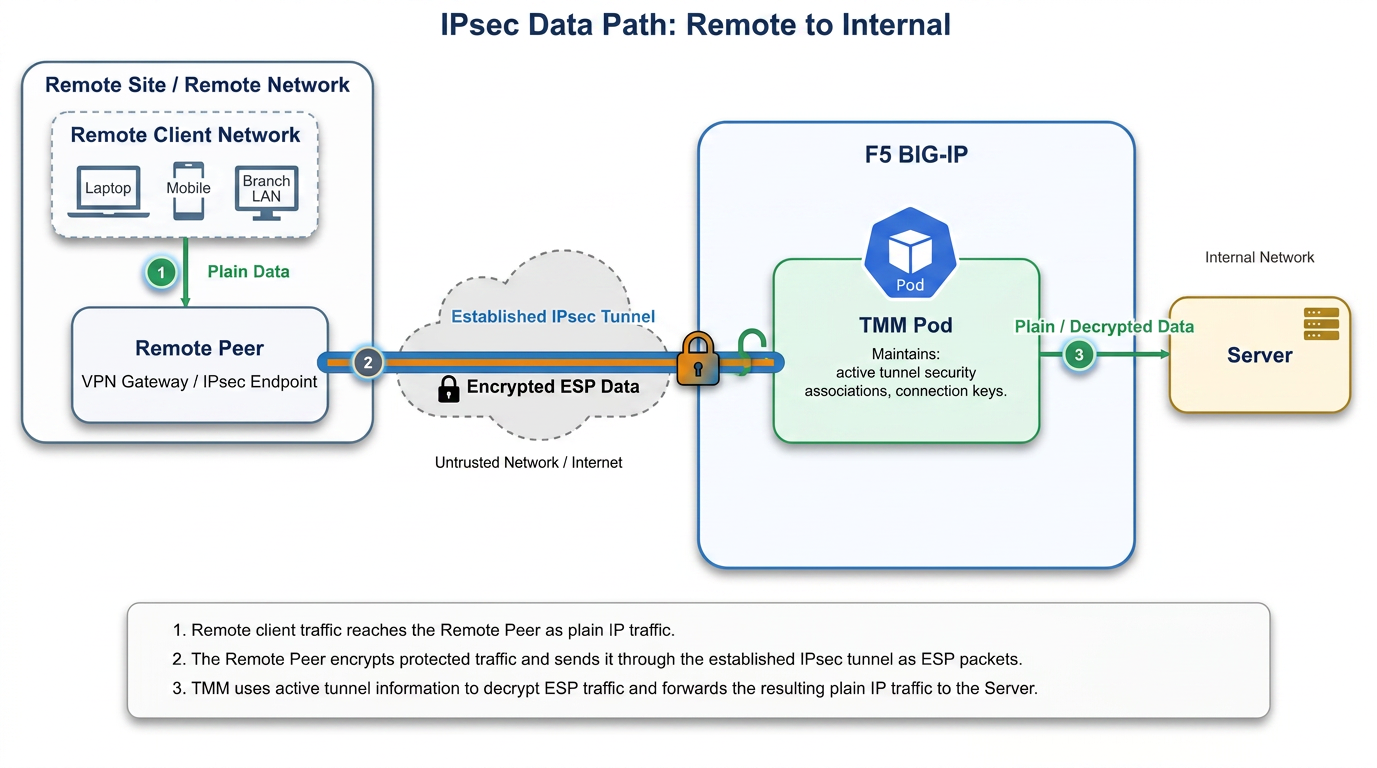
TMM pods handle the actual packet processing. Each TMM pod:
Owns and manages IPsec SAs
Encrypts outbound data-plane packets coming from and decrypts inbound Encapsulating Security Payload (ESP) packets
Verifies packet integrity
Security Policies (SPs)
Security Policies (SPs) define the rules for how traffic should be protected by IPsec. Each SP specifies the traffic selectors, the required security services (encryption and/or authentication), and the associated IPsec SAs that enforce these rules.
Security Associations (SAs)
IPsec uses two types of SAs:
| SA type | Purpose |
|---|---|
| IKE SA | Manages the secure control channel between peers. Handles key exchange, authentication, and negotiation |
| IPsec SA | Protects data-plane traffic. Defines the encryption algorithm, authentication algorithm, and keys used for a specific traffic flow |
Initiator and Responder
IPsec on CNF can operate in either initiator or responder:
Initiator: The CNF initiates the IPsec tunnel with the remote peer.
Responder: The remote peer initiates the IPsec tunnel with the CNF.
IKE persistence
CNF continuously saves IKE session state to the Distributed Session State Manager (DSSM). If the IPsec pod restarts, it rebuilds all IKE sessions from DSSM without renegotiating with peers. This means active IPsec tunnels remain undisturbed during IPsec pod restarts or upgrades.
Configuration model
You can configure IPsec using the following Custom Resource Definition (CRD):
F5BigIkePeer — Defines the remote peer, IKE proposals, authentication method, IPsec policies, and traffic selectors in a single resource.
Supported capabilities
CNF supports the following IPsec capabilities:
Static tunnels in tunnel mode
IPsec as initiator and responder
IKEv2 protocol
Pre-Shared Key (PSK) and certificate peer authentication
Multiple encryption and authentication algorithm options
IPv4 and IPv6 tunnel endpoints
Logging to Fluentd, metrics to the stats infrastructure, and qkview support
Configure IPsec static tunnels
This section walks you through creating a static IPsec tunnel on CNFs. After you complete these steps, your system will have an encrypted tunnel between two peers using IKEv2.
Before you begin
Make sure you have:
CNF 2.4 or later installed and running
kubectlaccess to the CNF cluster with permissions to create Custom Resources (CRs)Configured IPsec pod network. See Configure IPsec Pod network on vanilla cluster and Configure the IPsec pod network on OpenShift for IPsec pod network configuration. After the required resources are provisioned, include the IPsec Helm values accordingly in the overrides file.
The IP addresses of the local (IPsec pod) and remote IPsec peers
A pre-shared key (PSK) or certificate
The subnet ranges for traffic you want to protect
If you use SP-DAG in your multi-pod deployment, make sure the hardware and software DAG hash settings match to avoid packet redirects. See Hardware DAG support for details.
IPsec is supported with both the default DAG and SP-DAG configurations in the TMM VLAN. If you use SP-DAG, see Disaggregation (DAG) Modes for more details.
Configure an IKE peer
The F5BigIkePeer CR defines the remote peer, IKE proposals, authentication method, IPsec policies, and traffic selectors in a single resource.
Create the Kubernetes Secrets for authentication.
For certificate authentication:
kubectl create secret tls ike-local-cert \
  --cert=local.crt --key=local.key \
  -n cnf-gateway
kubectl create secret generic ike-remote-ca \
  --from-file=ca.crt=remote-ca.crt \
  -n cnf-gateway
For preshared key authentication:
kubectl create secret generic ike-psk-secret \
  --from-literal=psk=your-preshared-key \
  -n cnf-gateway
Create a YAML file named
ike-peer.yamland copy one of the following YAML examples. Update the values to match your environment:
IPsec tunnel with certificate authentication
apiVersion: "k8s.f5net.com/v1"
kind: F5BigIkePeer
metadata:
  name: "ipsec-peer-cert"
  namespace: "cnf-gateway"
spec:
  name: "ike-peer-west"
  remoteAddress: "203.0.113.1"
  lifetime: 1440
  dpdDelay: 30
  proposals:
    - integrity: "sha256"
      encryption: "aes256"
      prf: "sha256"
      dhGroup: "modp2048"
  local:
    id: "10.10.10.1"
    auth: "certificate"
    certificateSecretRef:
      name: "ike-local-cert"
      certificate: "tls.crt"
      privateKey: "tls.key"
  remote:
    id: "203.0.113.1"
    auth: "certificate"
    secretRef:
      name: "ike-remote-ca"
      caCertificate: "ca.crt"
  ipsecPolicies:
    - name: "ipsec-policy-1"
      localAddress: "10.10.10.1"
      remoteAddress: "203.0.113.1"
      proposals:
        - integrity: "sha256"
          encryption: "aes256"
          dhGroup: "modp2048"
      trafficSelectors:
        - name: "ts-all-traffic"
          sourceAddress: "10.0.0.0/8"
          destinationAddress: "172.16.0.0/12"
IPsec tunnel with preshared key authentication
apiVersion: "k8s.f5net.com/v1"
kind: F5BigIkePeer
metadata:
  name: "ipsec-peer-psk"
  namespace: "cnf-gateway"
spec:
  name: "ike-peer-east"
  remoteAddress: "198.51.100.1"
  lifetime: 720
  dpdDelay: 15
  proposals:
    - integrity: "sha512"
      encryption: "aes256"
      prf: "sha512"
      dhGroup: "modp4096"
  local:
    id: "gw.example.com"
    auth: "presharedkey"
  remote:
    id: "peer.example.com"
    auth: "presharedkey"
    secretRef:
      name: "ike-psk-secret"
      presharedKey: "psk"
  ipsecPolicies:
    - name: "ipsec-policy-psk"
      localAddress: "10.10.10.1"
      remoteAddress: "198.51.100.1"
      proposals:
        - integrity: "sha256"
          encryption: "aes256"
          dhGroup: "modp2048"
      trafficSelectors:
        - name: "ts-web"
          sourceAddress: "10.10.10.0/24"
          destinationAddress: "192.168.1.0/24"
          protocol: "tcp"
          destinationPort: 443
IPsec tunnel with multiple policies and traffic selectors
apiVersion: "k8s.f5net.com/v1"
kind: F5BigIkePeer
metadata:
  name: "ipsec-peer-multi"
  namespace: "cnf-gateway"
spec:
  name: "ike-peer-multi-policy"
  remoteAddress: "192.0.2.1"
  local:
    id: "10.10.10.1"
    auth: "certificate"
    certificateSecretRef:
      name: "ike-local-cert"
  remote:
    id: "192.0.2.1"
    auth: "certificate"
    secretRef:
      name: "ike-remote-ca"
  ipsecPolicies:
    - name: "policy-mgmt"
      description: "Management traffic"
      localAddress: "10.10.10.1"
      remoteAddress: "192.0.2.1"
      lifetime: 480
      proposals:
        - integrity: "sha384"
          encryption: "aes192"
          dhGroup: "modp3072"
      trafficSelectors:
        - name: "ts-ssh"
          sourceAddress: "10.10.10.0/24"
          destinationAddress: "192.0.2.0/24"
          protocol: "tcp"
          destinationPort: 22
        - name: "ts-snmp"
          sourceAddress: "10.10.10.0/24"
          destinationAddress: "192.0.2.0/24"
          protocol: "udp"
          destinationPort: 161
    - name: "policy-data"
      description: "Application data traffic"
      localAddress: "10.10.10.1"
      remoteAddress: "192.0.2.1"
      proposals:
        - integrity: "sha384"
          encryption: "aes192"
          dhGroup: "modp3072"
      trafficSelectors:
        - name: "ts-app"
          sourceAddress: "10.10.0.0/16"
          destinationAddress: "172.16.0.0/12"
IPsec tunnel with IPv6
apiVersion: "k8s.f5net.com/v1"
kind: F5BigIkePeer
metadata:
  name: "ipsec-peer-v6"
  namespace: "cnf-gateway"
spec:
  name: "ike-peer-v6"
  remoteAddress: "2001:db8:100::1"
  local:
    id: "2001:db8::1"
    auth: "presharedkey"
  remote:
    id: "2001:db8:100::1"
    auth: "presharedkey"
    secretRef:
      name: "ike-psk-v6"
  ipsecPolicies:
    - name: "ipsec-v6"
      localAddress: "2001:db8::1"
      remoteAddress: "2001:db8:100::1"
      proposals:
        - integrity: "sha384"
          encryption: "aes192"
          dhGroup: "modp3072"
      trafficSelectors:
        - name: "ts-v6"
          sourceAddress: "2001:db8:1::/48"
          destinationAddress: "2001:db8:2::/48"
Edit the CR parameters to match your environment. You must set:
name and remoteAddress — the IKE peer identity and address.
local — local peer identity, authentication method, and credentials.
remote — remote peer identity, authentication method, and credentials.
ipsecPolicies — at least one IPsec policy with tunnel endpoints and traffic selectors.
Apply the F5BigIkePeer CR:
kubectl apply -f ike-peer.yaml -n <namespace>
Verify the IKE peer is installed.
kubectl get <plural-name> -n <namespace>
View the established IKE connections using the following command:
kubectl exec -it <ipsec-pod-name> -- ipsecctl --list-conn
Verify the tunnel is active
After you apply the IKE peer CR, CNF initiates IKEv2 negotiation with the remote peer.
To check the tunnel status, run the following commands on the IPsec pod:
View all active Security Associations (SAs):
kubectl exec -it <ipsec-pod-name> -- ipsecctl --list-sas
View detailed SA information, including packet counts and lifetimes:
kubectl exec -it <ipsec-pod-name> --ipsecctl --list-sas --details
View a specific connection:
kubectl exec -it <ipsec-pod-name> -- ipsecctl --list-sas static-ike-peer-cr
Configure IPsec for multi-pod ECMP deployments
If your CNF deployment runs multiple TMM pods with ECMP routing, traffic inside IPsec tunnels can fail when different TMM pods handle packets from the same session.
This section explains the problem and how to configure your system to prevent traffic drops.
When to use this configuration
Apply this configuration when all of the following conditions are true:
Your deployment operates in initiator mode, or in responder mode with reverse data traffic
Your CNF deployment runs multiple TMM pods
ECMP routing is enabled
Your deployment uses FastL4 loose initiation with Secure Context and SNAT disabled
The problem: ECMP asymmetric flow
When ECMP is enabled, packets belonging to the same flow can be processed by different TMM pods. Because each TMM pod maintains connection state locally, a TMM pod that receives a packet for a connection it did not originate treats it as invalid and sends a TCP reset (RST).
Example:
A server sends a TCP SYN packet. ECMP routes it to TMM1.
TMM1 creates a connection table entry, encrypts the packet inside ESP, and sends it to the remote peer.
The remote peer responds with a TCP SYN-ACK inside ESP.
ECMP routes the response to TMM2 instead of TMM1.
TMM2 decrypts the ESP packet but finds no matching session state.
TMM2 sends a TCP RST and the connection fails.
The solution: FastL4 loose initiation with Secure Context
To resolve this, configure a FastL4 profile with loose initiation and attach it to a Secure Context with SNAT disabled.
Why loose initiation is required
When looseInitiation is set to true, a TMM pod can process packets even when it did not observe the initial SYN packet. This allows TMM2 to forward the SYN-ACK to the server instead of resetting the connection.
Configure the FastL4 profile
Create a YAML file named
fastl4-loose.yaml:apiVersion: "k8s.f5net.com/v1" kind: F5BigFastl4Setting metadata: name: fastl4-loose-init spec: idleTimeout: 5 looseInitiation: true looseClose: true
Apply the CR:
kubectl apply -f fastl4-loose.yaml
Configure the Secure Context
Create a YAML file named secure-context.yaml:
apiVersion: "k8s.f5net.com/v1"
kind: F5BigContextSecure
metadata:
  name: ipsec-secure-context
spec:
  destinationAddress: 0.0.0.0/0
  ipv6destinationAddress: ::/0
  ipProtocol: "any"
  destinationPort: 0
  profile: "fastL4"
  fastL4Settings:
    profileName: fastl4-loose-init
Note
Do not set a SNAT type on this Secure Context. The default (no SNAT) ensures that TMM forwards packets without modifying IP addresses.
Apply the CR:
kubectl apply -f secure-context.yaml