Rollback a software installation
Overview
F5 Insight lets you rollback a software installation to the previous software version when an upgrade does not go as expected. For BIG-IP rollback targets devices that successfully rebooted into the new software volume during an installation job — reverting them to the volume they ran before the install.
You can initiate a rollback using either the web console or the REST API.
Key capabilities include:
- Rollback all eligible devices in a single action, or select a subset.
- Inherit HA, Human-in-the-Loop (HITL), and failover behavior from the original installation run - no need to reconfigure.
- BIG-IP and F5OS both supported.
Important
Rollback operations are available to administrator users only.
Concepts
Rollback eligibility
Not every device in an installation job is eligible for rollback. Only devices that reached the REBOOT phase (or later) in the target installation execution are eligible — these are the devices that switchbooted to a new volume and may need to be reverted.
Devices that failed before the REBOOT phase (for example, during INSTALL or VALIDATION) remain on their previous volume and do not need rollback.
| Device state during installation | Rollback eligible? | Reason |
|---|---|---|
| Reached REBOOT or later (e.g. COMPLETED, FAILED after reboot) | Yes | Device switchbooted to the new volume |
| Failed before REBOOT (e.g. failed during INSTALL or VALIDATION) | No | Device never left the previous volume — no rollback needed |
Rollback target execution
Rollback always targets the latest terminal (COMPLETED, FAILED, or CANCELLED) installation execution on the job. You cannot rollback a rollback — if the latest execution is itself a rollback, re-activate the job to roll forward instead.
How rollback works
| Device type | Rollback method |
|---|---|
| BIG-IP | F5 Insight switchboots the device to the previous boot volume (the volume it ran before the install). |
| F5OS (rSeries) | F5 Insight invokes f5-system-rollback on the appliance. |
Use the web console
Rollback a software installation job
- Go to the Manage section in the left toolbar and select Automation.
- Select Jobs.
- Locate the software installation job you want to rollback and open it. Select the completed installation execution to view its details.
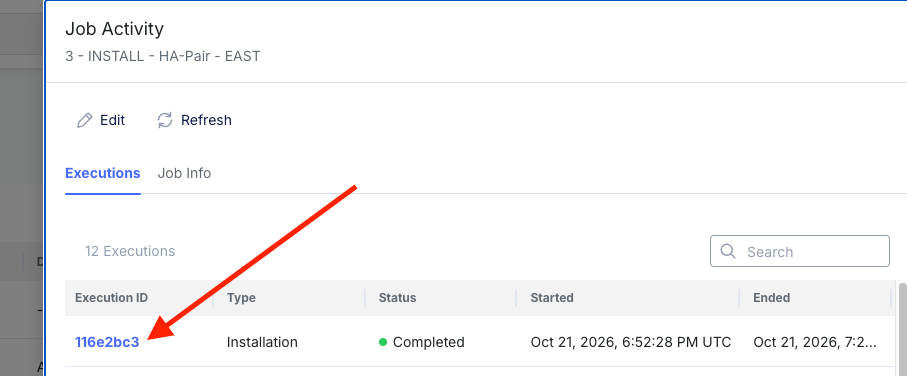
- In the execution detail view, select the devices to include in the rollback using the checkboxes. For HA Pairs, selections will happen as pairs. For Standalone/Bulk jobs, individual devices can be selected. Then select the Rollback button in the bottom right corner.
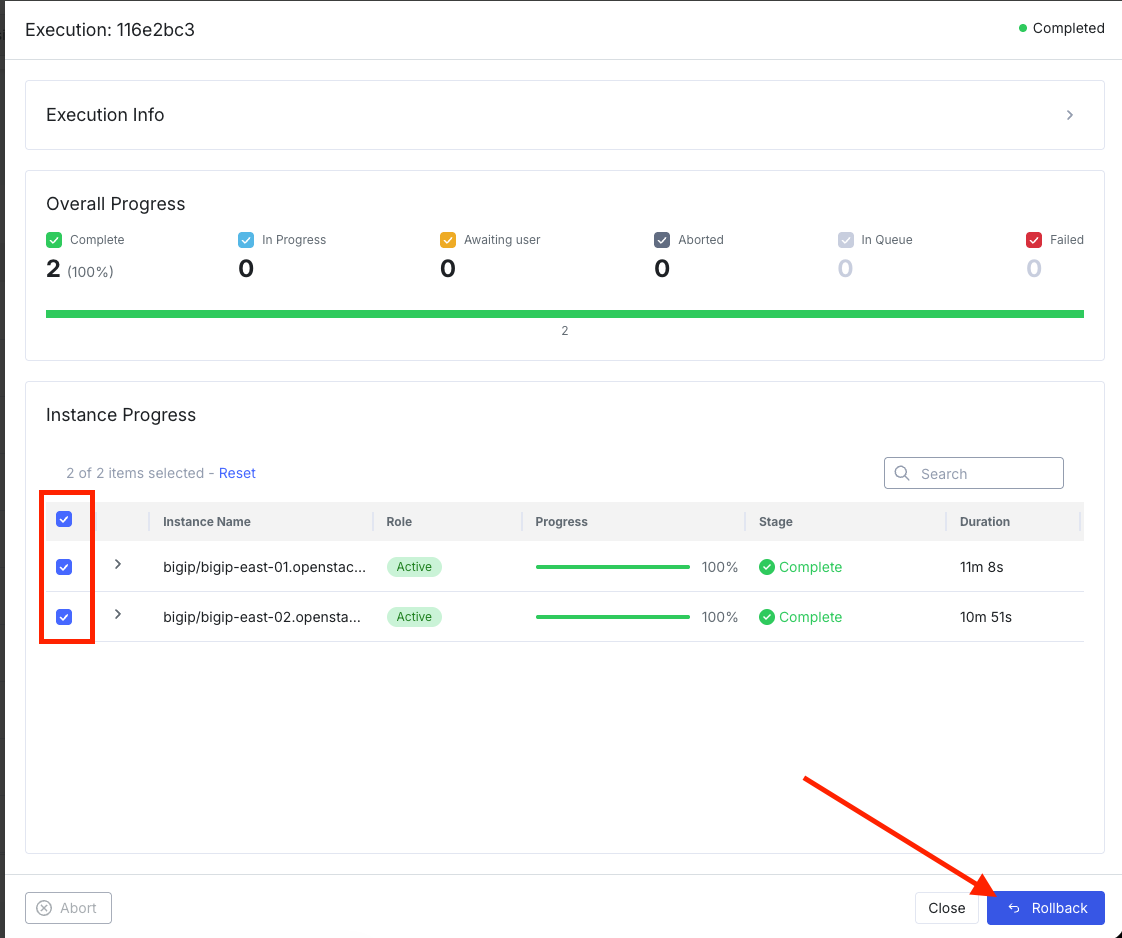
- The Confirm Rollback Job Execution dialog appears. Review the caution notice, acknowledge that configuration changes since the installation will be lost, optionally enter a Change Request ID, verify the instances and their rollback volumes, then type
BEGIN ROLLBACKto confirm and select Execute Rollback.
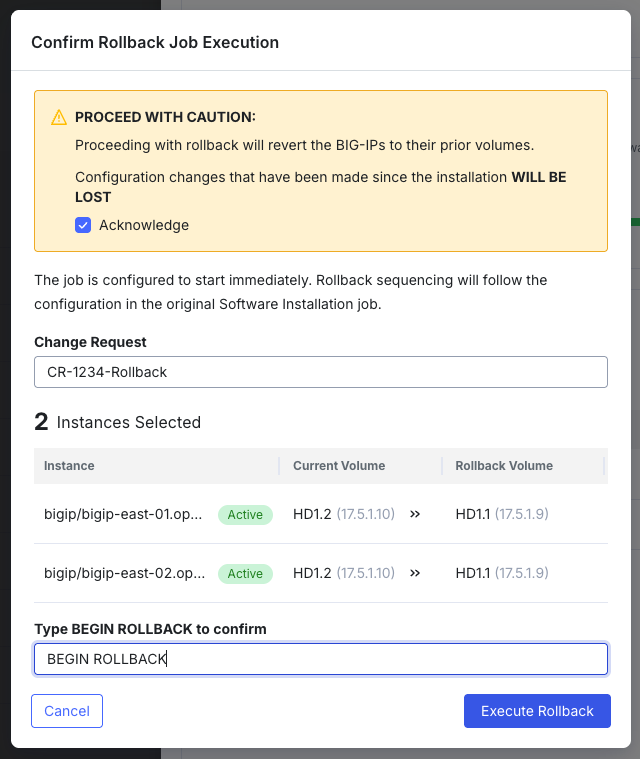
F5 Insight creates a new rollback execution on the job and displays its progress. The rollback inherits the same HA, HITL, and failover settings as the original installation run. When complete, the Software Details column shows the before and after volumes for each instance.
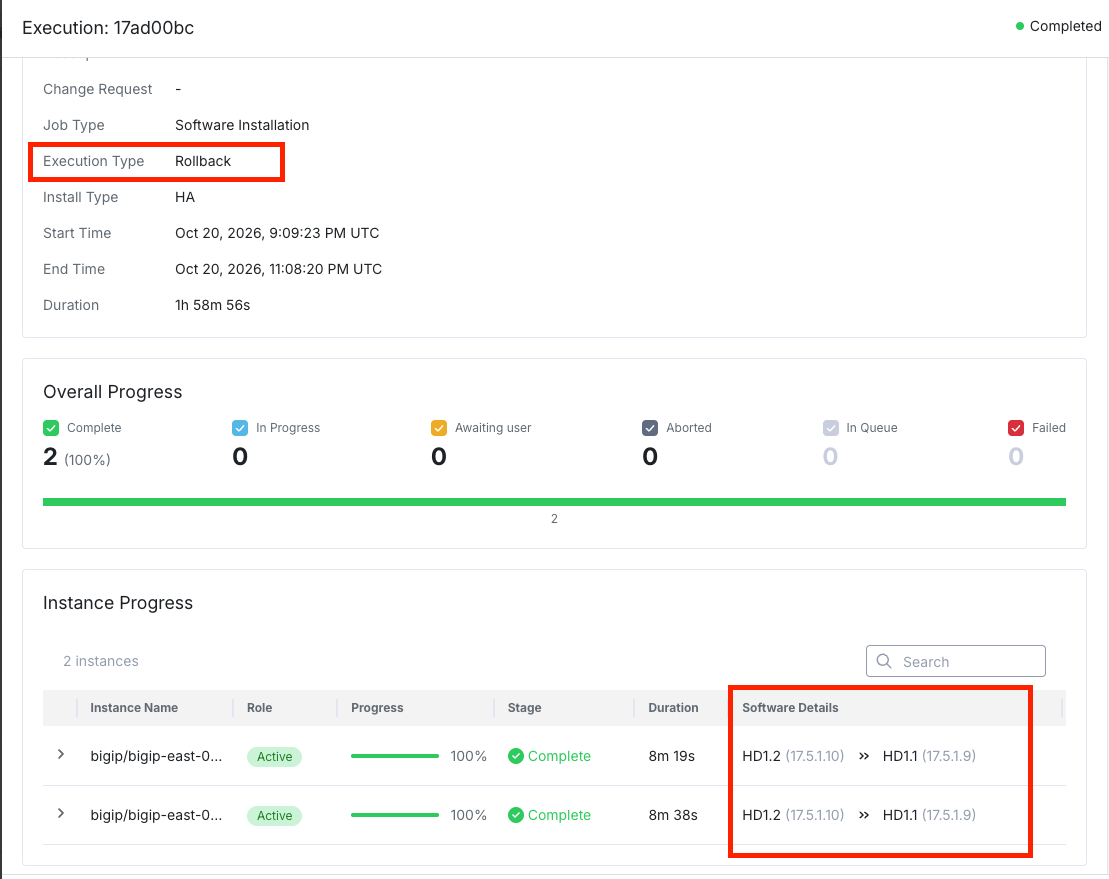
Note
If the Rollback button is not available, either an execution is already running on this job, or no eligible devices exist in the last terminal installation execution.
Warning
Rolling back a device causes a reboot and a brief service interruption. For HA pairs, F5 Insight applies the same HA sequencing as the original installation — the standby device is rolled back first, then the active device after a controlled failover.
Use the REST API
The rollback endpoint is part of the Software Installation job API. All endpoints are under the base path /api/v1/fleet/upgrade and require a valid JWT token. Requests from non-administrator users are rejected with HTTP 401.
Rollback endpoint
| Method | Endpoint | Description |
|---|---|---|
POST |
/jobs/software-installation/{jobId}/rollback |
Initiate a rollback of the latest terminal installation execution. Request body is optional — omit it to rollback all eligible devices with the same execution settings as the original run. Returns 202 Accepted with the created ROLLBACK execution. |
Request body fields (all optional)
| Field | Type | Description |
|---|---|---|
deviceTargets |
array (optional) | Subset of eligible devices to rollback. Each entry requires a deviceId (UUID). Devices not in the eligible set return HTTP 400. If omitted, all eligible devices are included. |
execution |
object (optional) | Execution-control overrides (HA sequencing, HITL settings, failover behavior). If omitted, settings are inherited field-by-field from the original installation execution. |
changeRequest |
string (optional) | Change-request identifier (e.g. CHG0012345) to associate with this rollback execution. |
Example: rollback all eligible devices
POST /api/v1/fleet/upgrade/jobs/software-installation/{jobId}/rollback
Content-Type: application/json
Authorization: Bearer <access_token>

{}
Example: rollback specific devices only
POST /api/v1/fleet/upgrade/jobs/software-installation/{jobId}/rollback
Content-Type: application/json
Authorization: Bearer <access_token>

{
  "deviceTargets": [
    { "deviceId": "aaaaaaaa-aaaa-aaaa-aaaa-aaaaaaaaaaaa" }
  ],
  "changeRequest": "CHG0012345"
}
Example response (202 Accepted)
{
  "executionId": "b1b2c3d4-0000-0000-0000-000000000001",
  "jobId": "a1b2c3d4-0000-0000-0000-000000000001",
  "executionType": "ROLLBACK",
  "targetExecutionId": "a1b2c3d4-0000-0000-0000-000000000002",
  "status": "RUNNING",
  "batchSize": 1,
  "totalDevices": 2
}
You can track rollback progress using the execution endpoints on the Software Installation job:
| Method | Endpoint | Description |
|---|---|---|
GET |
/jobs/software-installation/{jobId}/executions |
List all executions (both INSTALLATION and ROLLBACK types) for the job, newest first. |
GET |
/jobs/software-installation/{jobId}/executions/{executionId} |
Get details and per-device progress for a specific execution. |
See also
For full request and response schemas, refer to the F5 Insight v2.0 API documentation.
Troubleshooting
| Issue | Cause | Resolution |
|---|---|---|
| Rollback button not available / API returns 409 | An execution is already running on the job, or no terminal installation execution with eligible devices exists. | Wait for any in-progress execution to complete. If no eligible devices exist (all devices failed before REBOOT), rollback is not applicable — those devices never left the previous volume. |
| API returns 400 — invalid deviceTargets | One or more specified devices are not in the eligible set for the target execution. | Check the target execution’s per-device status. Only devices that reached the REBOOT phase are eligible. Remove ineligible device IDs from the request. |
| Rollback execution fails on a device | The switchboot or f5-system-rollback operation failed on the device. |
Open the execution and check the per-device step timeline for the error. Common causes: device unreachable during reboot, volume no longer valid, or F5OS rollback command rejected. |
| Cannot rollback a rollback | The latest terminal execution on the job is itself a ROLLBACK execution. | You cannot rollback a rollback. Re-activate the job to roll forward (install the software again). |
| HA pair rolled back out of order | This should not happen — F5 Insight inherits HA sequencing from the original installation execution by default. | If the behavior is unexpected, check the execution overrides in the rollback request. If the body was empty, the HA sequencing from the original run was used. |
If an issue persists, contact F5 Support and provide the job name, execution ID, date, and the per-device error message from the execution detail view. Include a Support Bundle to help F5 Support diagnose the issue. See Generate a support bundle.