BIG-IP integration

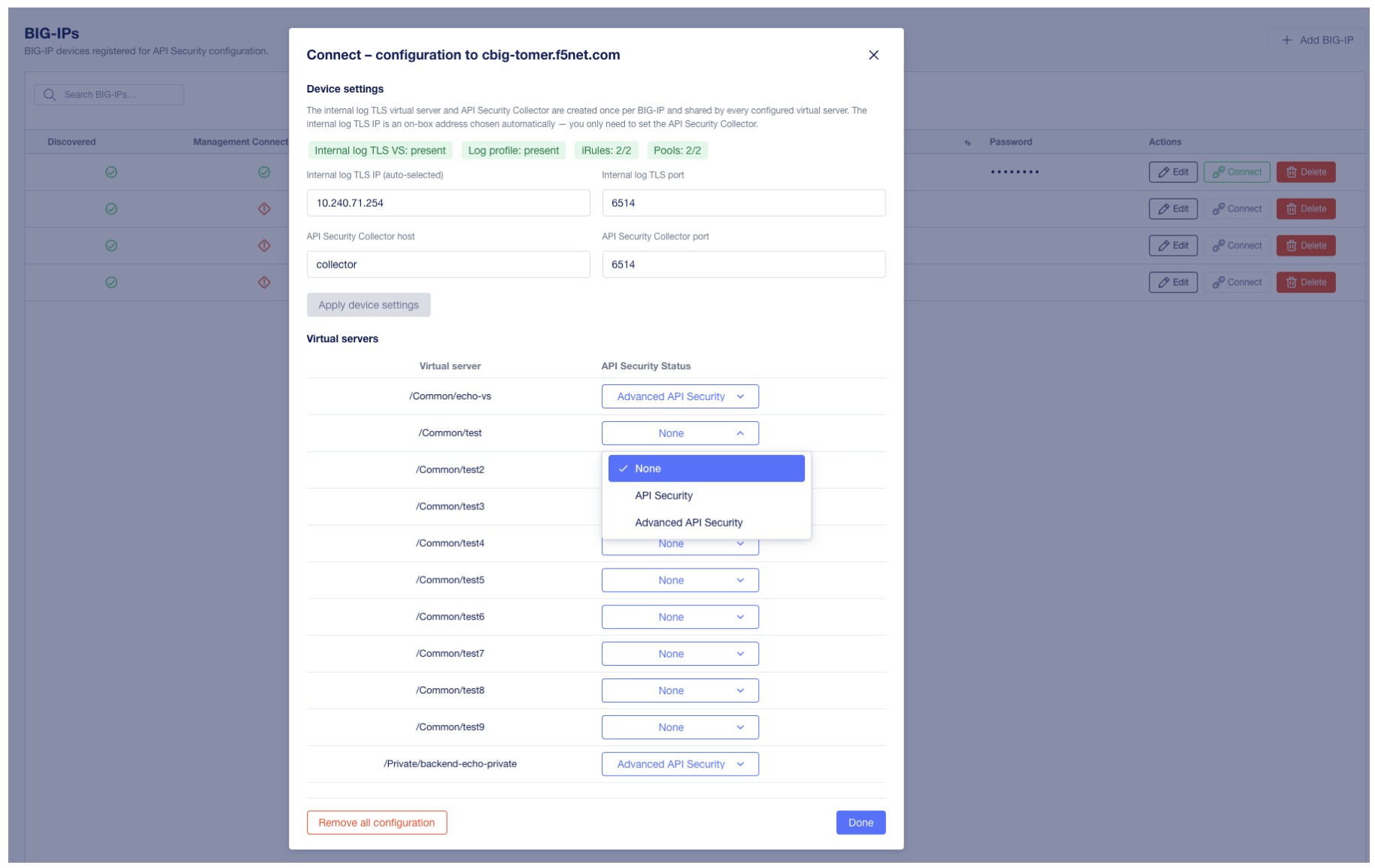
API Security Local Edition is integrated with BIG-IP through a logging configuration that exports HTTP metadata to the product’s Collector. Optionally, the product can be granted management connectivity to BIG-IP to enable enforcement actions.

Integration overview

Integration Guide in the API Security UI

Figure 3. The Integration Guide view in the API Security user interface provides UI, TMSH, and REST configuration methods, with environment-specific values.

The user interface includes an Integration > Integration Guide view that provides environment-specific configuration values and step-by-step instructions for each configuration method. This admin guide describes the canonical configuration sequence.

Prerequisites

Before configuring the integration, verify the following:

  • An existing API Virtual Server is configured on BIG-IP and is the target for discovery.

  • Network connectivity exists from BIG-IP to the API Security Collector on TCP 6514.

  • A serverssl profile is available for the Internal Logging Virtual Server (recommended for encrypted logging).

  • Management connectivity from API Security to BIG-IP on TCP 443 is permitted (required only if enforcement actions are intended).

Configuration sequence

Configure the integration in the following order. Each step builds on the previous one.

  1. External Collector Pool. Create a pool that points at the API Security Collector on port 6514.

  2. Internal Logging Virtual Server. Create a virtual server on service port 6514 that uses the External Collector Pool and has a serverssl profile attached on the server side.

  3. Internal Logging Pool. Create a pool that points at the Internal Logging Virtual Server.

  4. iRule. Create an iRule and configure the Internal Logging Pool name within it.

  5. Attach iRule. Attach the iRule to the existing API Virtual Server.

The required iRule body is provided in the Integration > Integration Guide view of the user interface and as a reference file in the installation package.

Configure BIG-IP through the GUI

The user interface includes step-by-step screenshots for each step of the GUI-based configuration. The high-level sequence is:

  1. Go to Local Traffic > Pools and create the External Collector Pool. The pool member port must be 6514.

  2. Create the Internal Logging Virtual Server with service port 6514. Attach the External Collector Pool. Add a serverssl profile in server-side context to encrypt traffic to the API Security Collector.

  3. Create the Internal Logging Pool that points at the Internal Logging Virtual Server.

  4. Create the iRule. Copy the iRule body from the Integration > Integration Guide view of the user interface or from the reference file in the installation package. Update the Internal Logging Pool name inside the iRule to match the pool created in the previous step.

  5. Attach the iRule to the existing API Virtual Server.

Configure BIG-IP through TMSH

The iRule references the Internal Logging Pool through a variable. Edit the variable inside the iRule to match the pool naming used in your environment.

The example below illustrates the configuration sequence. Substitute the placeholder IP addresses with values appropriate for your environment.

# Variables
COLLECTOR_IP=1.1.1.1
INTERNAL_LOGGING_VS_IP=2.2.2.2

tmsh -q <<TMSH

# 1. External Collector Pool pointing at the API Security Collector
create ltm pool API_SECURITY_COLLECTOR_POOL \
  members add { ${COLLECTOR_IP}:6514 { address ${COLLECTOR_IP} } }

# 2. Internal Logging Virtual Server using the External Collector Pool with serverssl
create ltm virtual INTERNAL_LOGGING_VS \
  destination ${INTERNAL_LOGGING_VS_IP}:6514 \
  source 0.0.0.0/0 \
  profiles add { tcp } \
  source-address-translation { type automap } \
  pool API_SECURITY_COLLECTOR_POOL

modify ltm virtual INTERNAL_LOGGING_VS \
  profiles add { serverssl { context serverside } }

# 3. Internal Logging Pool pointing at the Internal Logging Virtual Server
create ltm pool INTERNAL_LOGGING_POOL \
  members add { ${INTERNAL_LOGGING_VS_IP}:6514 { address ${INTERNAL_LOGGING_VS_IP} } }

TMSH

To create the iRule and attach it to the API Virtual Server:

# 4. Create the iRule (copy the body from the Integration Guide view)
tmsh create ltm rule ApiSecurityDiscoveryRule definition {
  # Paste the iRule body here
}

# 5. Attach the iRule to the existing API Virtual Server
tmsh modify ltm virtual <API_VS_NAME> rules add { ApiSecurityDiscoveryRule }

tmsh save sys config

Configure BIG-IP through the iControl REST API

The iControl REST API supports the same configuration sequence:

  1. Authenticate to BIG-IP using basic authentication or a token.

  2. Create the External Collector Pool, Internal Logging Virtual Server, and Internal Logging Pool through the REST API.

  3. Create the iRule through the REST API.

  4. Patch the existing API Virtual Server to attach the iRule.

For ready-to-use REST API request examples, see the Integration > Integration Guide view of the user interface.

Register a BIG-IP device for management

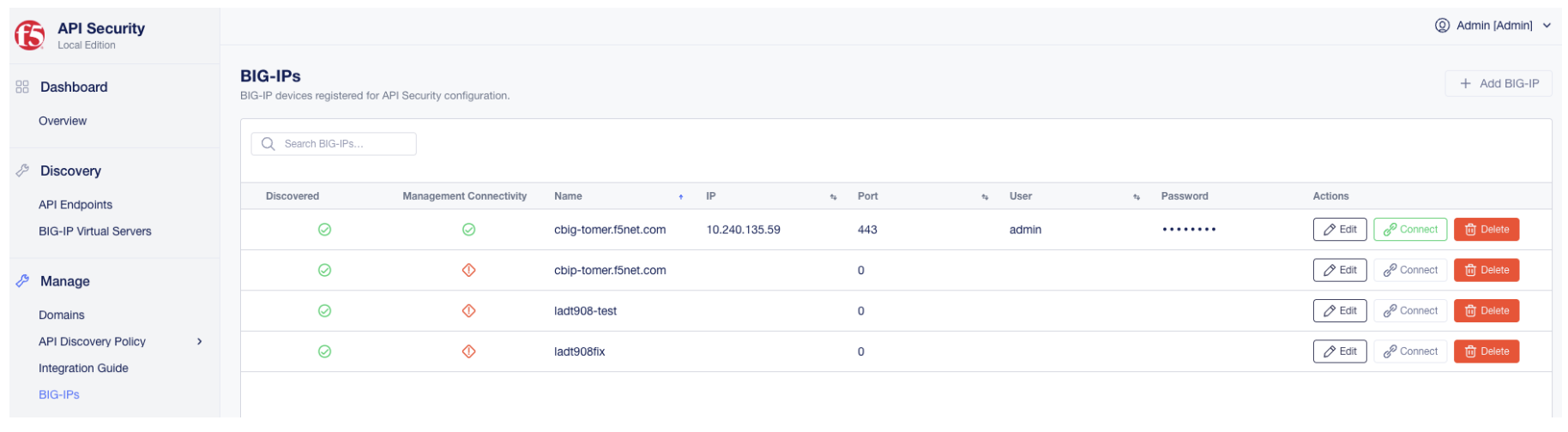
To enable enforcement actions such as blocking shadow APIs, each BIG-IP device must be registered for management connectivity. This step is not required for discovery.

BIG-IPs Devices page

Figure 4. The BIG-IPs Devices page lists discovered BIG-IP devices and their management connectivity status.

To register a BIG-IP device:

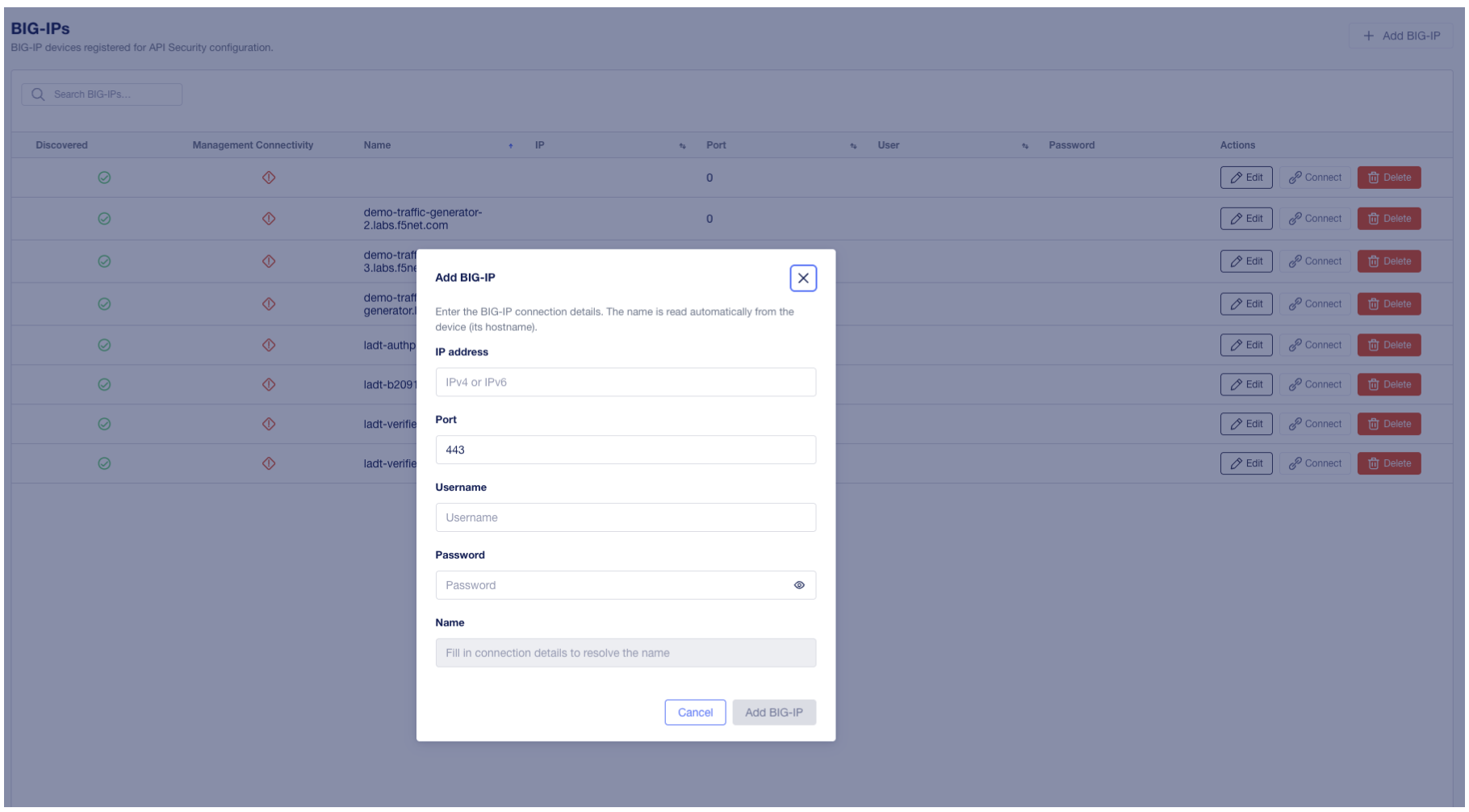
  1. Go to Integration > BIG-IPs.

  2. Locate the inline form at the bottom of the device list.

  3. Enter the Name, IPv4 or IPv6 address, Port, User, and Password.

  4. Select Add.

The device list shows two status columns:

Column

Meaning

Discovered

Indicates whether the product has received metadata from the device

Management Connectivity

Indicates whether the product can reach the device on its management interface

Both columns must report a successful state before enforcement actions can be performed against the device.

Validate the integration

After completing the configuration steps:

  1. Generate or wait for traffic to the API Virtual Server on BIG-IP.

  2. In the API Security user interface, go to the dashboard and confirm that ingestion counters increase.

  3. Confirm that endpoints begin to appear after the first analysis cycle completes.

If ingestion does not occur, see Troubleshooting.

Enforcement and known limitations

When a user triggers a block from the user interface, the product calls the BIG-IP iControl REST API to update the relevant WAF policy. BIG-IP then enforces the block.

For enforcement to function correctly, ensure that the Web Application Firewall (WAF) policy on BIG-IP is configured to differentiate between HTTP and HTTPS schemes. If scheme differentiation is not configured, the policy update will fail to apply. For full details, see Known issues in the API Security Local Edition Release Notes.

Optional: Advanced API Discovery with BIG-IP Advanced WAF

Advanced API Discovery is an optional enrichment layer that builds on top of the standard BIG-IP integration. It uses BIG-IP Advanced WAF / ASM inspection and High-Speed Logging (HSL) to collect additional API signals and enrich the data already gathered by the standard integration.

Important

Configure Advanced API Discovery only after the standard BIG-IP integration is configured and confirmed to be working. Advanced API Discovery does not replace the standard integration; it adds API context on top of the standard metadata collected by the API Security iRule flow.

What Advanced API Discovery adds

The standard integration collects per-request HTTP metadata through the API Security iRule. Advanced API Discovery adds a second signal source: BIG-IP Advanced WAF / ASM inspects API traffic and forwards additional API signals through HSL logging to the existing API Security Collector. The result is a richer endpoint inventory with additional API context.

Prerequisites

Before configuring Advanced API Discovery, verify the following:

  • The standard BIG-IP integration is configured and confirmed to be working. Endpoints already appear in the API Security dashboard.

  • BIG-IP Advanced WAF / ASM is provisioned on the BIG-IP system.

Configure Advanced API Discovery through the GUI

The user interface includes step-by-step screenshots for each step. The high-level sequence is:

  1. Create an ASM policy. Go to Security > Application Security > Security Policies > Policies List and create a new policy. Choose to upload a Swagger (OpenAPI) file and upload an empty Swagger file, then set the enforcement mode to Transparent. An empty Swagger file can be copied or downloaded from the Integration > Integration Guide view of the API Security user interface.

  2. Create the supporting iRule. Go to Local Traffic > iRules and create the supporting iRule. This iRule reformats the Advanced API Discovery data. Copy the iRule body from the Integration > Integration Guide view of the API Security user interface.

  3. Create the HSL logging profile. Go to Security > Event Logs > Logging Profiles and create a logging profile. Configure the remote storage destination to point at the Internal Logging Virtual Server on port 6514, and select all required fields in the order shown in the user interface.

  4. Enable the iRule on the reporting server. Attach the supporting iRule to the Internal Logging Virtual Server.

  5. Enable the ASM policy and HSL profile on the API Virtual Server. On the existing API Virtual Server, attach the websecurity profile, apply the ASM policy, and attach the HSL logging profile.

  6. Save the configuration.

After completing these steps, validate that additional data is reflected in the API Security dashboard.

Configure Advanced API Discovery through TMSH

The example below illustrates the configuration sequence. Substitute the placeholder names and addresses with values appropriate for your environment.

# 1. Create the supporting iRule
#    (copy the iRule body from the Integration Guide view in the API Security UI)
tmsh create ltm rule AdvancedApiDiscoveryRule definition {
  # Paste the supporting iRule body here
}

# 2. Create the HSL logging profile
tmsh create security log profile ASM_LOGGING_PROFILE \
  application add { asm { \
    filter add { \
      log-challenge-failure-requests { values add { disabled } } \
      request-type { values add { all } } \
    } \
    format { \
      fields { attack_type blocking_exception_reason conviction_traps date_time \
        dest_ip enforced_by enforcement_action ip_with_route_domain method \
        operation_id policy_name protocol protocol_info query_string request_status \
        response_code severity sub_violations support_id threat_campaign_names \
        unit_hostname uri username violation_details violation_rating violations \
        vs_name headers } \
    } \
    local-storage disabled \
    logger-type remote \
    maximum-entry-length 64k \
    remote-storage remote \
    response-logging all \
    servers add { ${INTERNAL_LOGGING_VS_IP}:6514 } \
  } }

# 3. Create the ASM policy
tmsh create asm policy EMPTY_SWAGGER_POLICY \
  policy-template POLICY_TEMPLATE_API_SECURITY encoding utf-8
tmsh create ltm policy /Common/Drafts/ASM_POLICY \
  strategy first-match \
  requires add { http } \
  controls add { asm } \
  rules add { default { actions add { 1 { asm enable policy EMPTY_SWAGGER_POLICY } } ordinal 1 } }
tmsh publish ltm policy /Common/Drafts/ASM_POLICY

# 4. Enable the iRule on the reporting server (Internal Logging Virtual Server)
tmsh modify ltm virtual INTERNAL_LOGGING_VS rules { AdvancedApiDiscoveryRule }

# 5. Enable the ASM policy and HSL profile on the API Virtual Server
tmsh modify ltm virtual <API_VS_NAME> \
  profiles add { websecurity } \
  policies add { ASM_POLICY } \
  security-log-profiles add { ASM_LOGGING_PROFILE }

tmsh save sys config

Validate Advanced API Discovery

After completing the configuration:

  1. Generate or wait for traffic to the API Virtual Server.

  2. In the API Security user interface, confirm that additional API context appears in the endpoint inventory.

If enriched data does not appear, confirm that the standard integration is still functioning, that BIG-IP Advanced WAF / ASM is provisioned, and that the ASM policy and HSL logging profile are attached to the API Virtual Server.