F5 Application Delivery Controller Solutions Source | Edit on
Lab 4: Test & Validate a Failover Scenario
In Lab 4, we will manipulate a BIG-IP interface to see how it affects basic failover events.
Lab Tasks:
Task 1: Disable a BIG-IP Interface
Task 2: Enable both Interfaces on ACTIVE BIG-IP
Task 1: Disable a BIG-IP Interface
In Task 1, we will simulate a "link down" failure on the ACTIVE BIG-IP, and determine if the BIG-IP will failover automatically.
We will compare the failover timing once we create & use our HA Group configuration design.
BONUS: From the BIG-IP CLI, perform a "follow" of the /var/log/ltm log to see logging data in real-time:
Access the "WEB SHELL" from UDF for each BIG-IP:
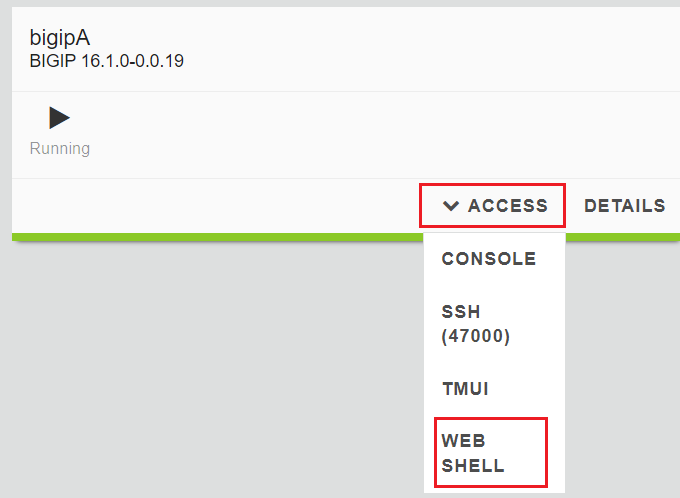
Run the following command at shell prompt:
tail -f /var/log/ltm
BIG-IP-A:

BIG-IP-B:

From the ACTIVE, BIG-IP, Navigate to: Network > Interfaces > place a checkmark next to 1.1 & click the "Disable" button
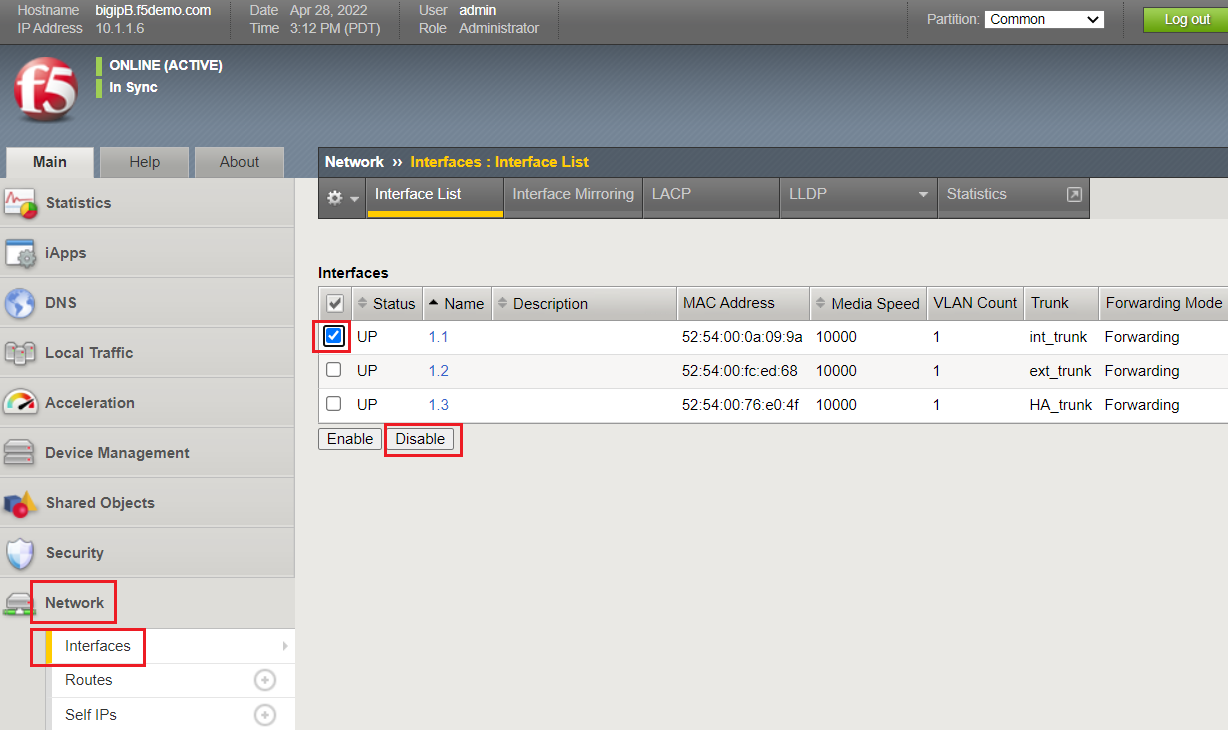
Question: |
Did the BIG-IP failover? Why or why not? |
|---|---|
Answer: |
No, the BIG-IP did not failover, as the interface objects are not part of the HA configuration. |
Log Output: |
Apr 28 15:13:47 bigipB.f5demo.com info lacpd[7293]: 01160016:6: Interface 1.1, link admin status: disabled, link status: up, duplex mode: full, lacp operation state: down Apr 28 15:13:47 bigipB.f5demo.com info lacpd[7293]: 01160010:6: Link 1.1 removed from aggregation Apr 28 15:13:47 bigipB.f5demo.com notice mcpd[4745]: 01bb0003:5: Trunk: int_trunk is DOWN Apr 28 15:13:47 bigipB.f5demo.com notice mcpd[4745]: 01b5004a:5: Link: 1.1 is DISABLED Apr 28 15:13:50 bigipB.f5demo.com warning sod[7297]: 010c0083:4: No failover status messages received for 3.100 seconds, from device bigipA.f5demo.com (10.1.1.5) (unicast: -> 10.1.10.242). |
Now, from the ACTIVE BIG-IP, Disable the 1.2 Interface.
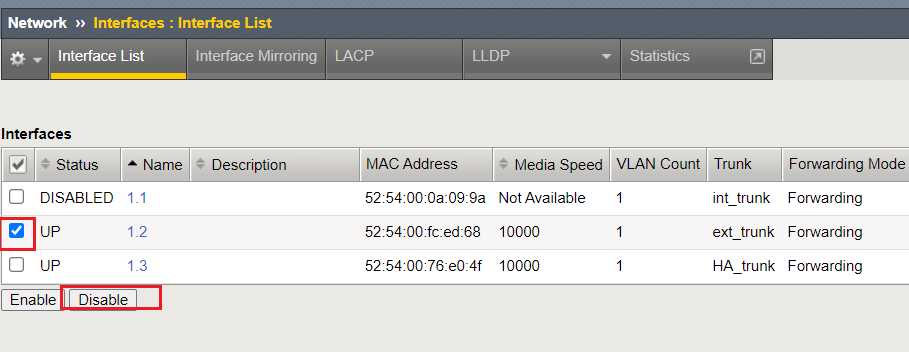
Question |
Did the BIG-IPs failover? Are they Active/Standby? |
|---|---|
Answer |
No failover. Both BIG-IPs in an Active / Active state |
Logs: |
Apr 28 15:19:38 bigipB.f5demo.com info lacpd[7293]: 01160016:6: Interface 1.2, link admin status: disabled, link status: up, duplex mode: full, lacp operation state: down Apr 28 15:19:38 bigipB.f5demo.com info lacpd[7293]: 01160010:6: Link 1.2 removed from aggregation Apr 28 15:19:38 bigipB.f5demo.com notice mcpd[4745]: 01bb0003:5: Trunk: ext_trunk is DOWN Apr 28 15:19:38 bigipB.f5demo.com notice mcpd[4745]: 01b5004a:5: Link: 1.2 is DISABLED Apr 28 15:19:41 bigipB.f5demo.com warning sod[7297]: 010c0083:4: No failover status messages received for 3.100 seconds, from device bigipA.f5demo.com (10.1.1.5) (unicast: -> 10.1.20.242). Apr 28 15:19:41 bigipB.f5demo.com notice sod[7297]: 010c007e:5: Not receiving status updates from peer device bigipA.f5demo.com (10.1.1.5) (Disconnected). |

Task 2: Enable both Interfaces on ACTIVE BIG-IP
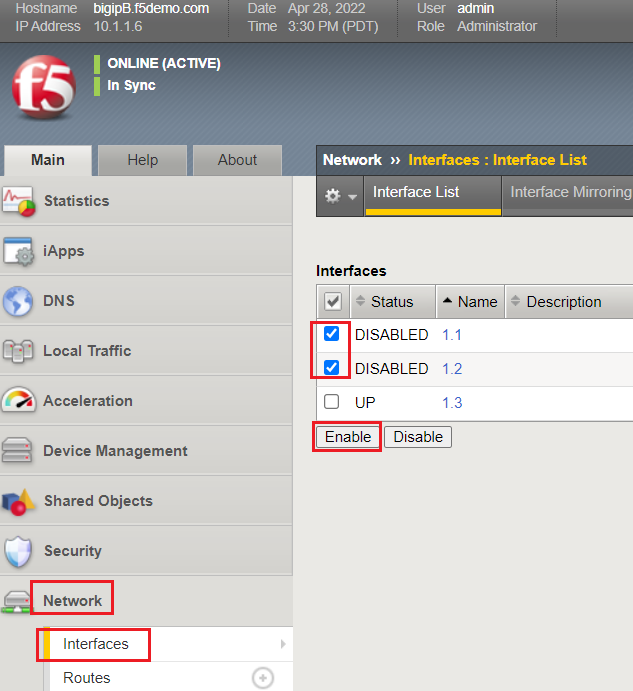
In Task 2, we will re-enable our BIG-IP interfaces to restore connectivity.
Navigate to: Network > Interfaces > place checkmarks in 1.1 & 1.2, then click the "Enable" button:
Lab Summary
In this lab, you tested & validated bringing down a BIG-IP interface, simulating a "link failure," and how that affects a failover event. After completion of these lab tasks, you should have an understanding of how the BIG-IP behaves in a typical HA design. The following labs will enhance the failover configuration, building a deeper understanding of best practices for HA.
This completes Lab 4.