Deploying applications and testing traffic
Overview
This guide explains how to deploy applications and test both ingress and egress traffic through F5 BIG-IP Next for Kubernetes.
You’ll complete the following tasks:
Ingress traffic — Deploy an NGINX application inside the cluster and configure a Layer 4 (L4) TCP gateway so external clients can reach it. You create a GatewayClass, GatewaySettings, Gateway, and L4Route to route inbound traffic through the Traffic Management Microkernel (TMM) to your application pods.
Egress traffic — Configure an EgressGateway so pods inside the cluster can send traffic to an external server. You create a GatewayClass, Infra, GatewaySettings, and EgressGateway to route outbound traffic through TMM with Source Network Address Translation (SNAT).
Prerequisites
Before you begin, verify that the following components are installed and running:
F5 BIG-IP Next for Kubernetes controller
Traffic Management Microkernel (TMM) instances
F5 IngressController/IP Address Management (IPAM) controller
Gateway API Custom Resource Definitions (CRDs)
Ingress traffic
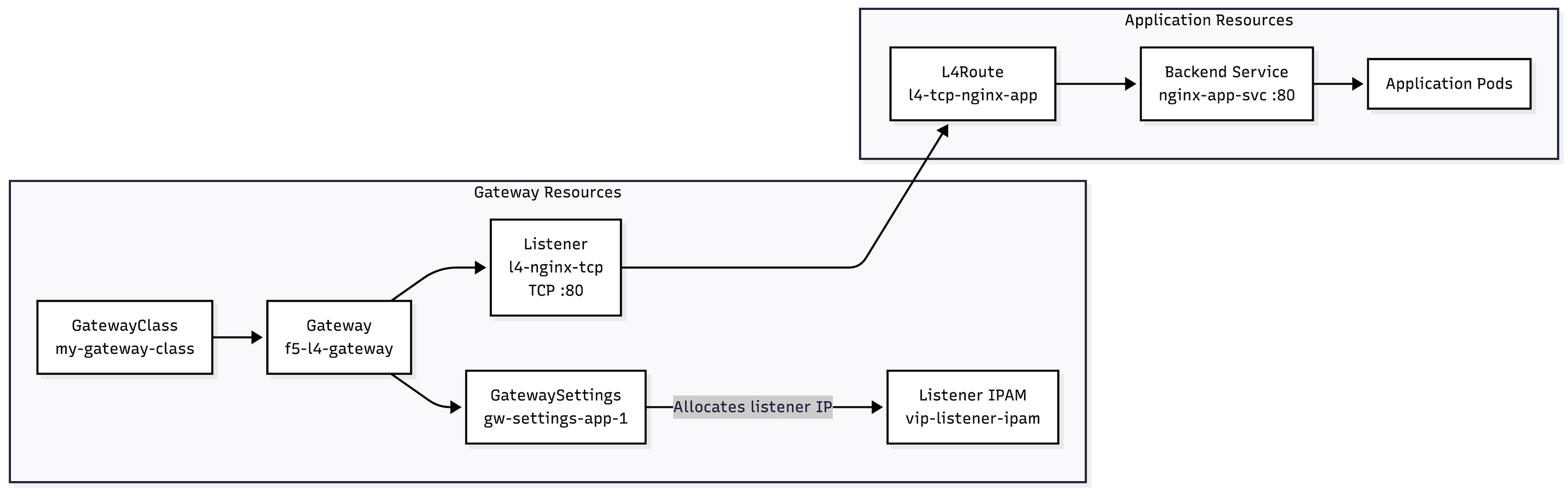
Ingress traffic originates from a client outside the Kubernetes cluster and is sent to a service running inside the cluster. In this example, an external client sends an HTTP request to an NGINX application in the app-ns namespace through a Layer 4 (L4) TCP gateway.
The traffic follows this path:

Return traffic from the application pod follows the same path in reverse through TMM, which forwards the response back to the external client.
The custom resources relate to each other as follows:
Example
Create a
nginx-app-deployfile with the content below:vi nginx-app-deploy.yaml
Contents:
apiVersion: apps/v1
kind: Deployment
metadata:
  name: nginx-deployment
  labels:
    app: nginx-tcp
spec:
  replicas: 1
  selector:
    matchLabels:
      app: nginx-tcp
  template:
    metadata:
      labels:
        app: nginx-tcp
    spec:
      containers:
      - name: nginx-tcp
        image: nginx:latest
        ports:
        - containerPort: 80
        imagePullPolicy: IfNotPresent
---
apiVersion: v1
kind: Service
metadata:
  name: nginx-app-svc
spec:
  type: LoadBalancer
  ports:
  - port: 80
    targetPort: 80
  selector:
    app: nginx-tcp
Deploy the NGINX application into a namespace that your BIG-IP Next for Kubernetes is watching (watchNamespace).
kubectl apply -f nginx-app-deploy.yaml -n <your application namespace>
Example:
kubectl apply -f nginx-app-deploy.yaml -n app-ns
Create a Gateway API application with custom resources to make the NGINX application accessible through a service proxy endpoint. The IP Address should be within the same CIDR range as your
externalnetwork and must not already be in use.For example, if your external network’s CIDR range is 192.168.10.0/24, any IP address between 192.168.10.1 and 192.168.10.255 will work.
Create a
gateway-tcp-cr.yamlfile with the contents below:vi gateway-tcp-cr.yaml
Note
Update the product-ns to the namespace in which CNEInstance CR is installed.
User must define
listeners.kinds.groupfor L4Route. Gateway CRs should be applied on app namespace.
Contents:
apiVersion: gateway.networking.k8s.io/v1
kind: GatewayClass
metadata:
  name: my-gateway-class
spec:
  controllerName: "f5.com/f5-bnk-instance-f5-cne-controller"
  description: "F5 BIG-IP Kubernetes Gateway"
---
apiVersion: gateway.k8s.f5.com/v1alpha1
kind: Infra
metadata:
  name: my-infra
  namespace: f5-bnk
spec:
  ipams:
    - name: external-vlan-selfip-ipam
      ipPools:
        - rangeStart: "20.0.0.40"
          rangeEnd: "20.0.0.50"

    - name: vip-listener-ipam
      ipPools:
        - rangeStart: "10.162.15.1"
          rangeEnd: "10.162.15.100"

  networkAttachments:
    - name: external-vlan-nad
      networkAttachmentDefinitions:
        - name: client-net

  networks:
    - name: external-vlan
      type: vlan
      vlan:
        mtu: 1500
        networkAttachmentRef:
          name: external-vlan-nad
        ipamRefs:
          - name: external-vlan-selfip-ipam
---
apiVersion: gateway.k8s.f5.com/v1alpha1
kind: GatewaySettings
metadata:
  name: gw-settings-app-1
  namespace: gateway-infra
spec:
  ingressConfig:
    defaultListenerNetwork:
      ipamRefs:
        - name: vip-listener-ipam
---
apiVersion: gateway.networking.k8s.io/v1
kind: Gateway
metadata:
  name: f5-l4-gateway
  namespace: gateway-infra
spec:
  infrastructure:
    parametersRef:
      group: gateway.k8s.f5.com
      kind: GatewaySettings
      name: gw-settings-app-1
  gatewayClassName: my-gateway-class
  listeners:
  - name: l4-nginx-tcp
    protocol: TCP
    port: 80
    allowedRoutes:
      namespaces:
      from: Same
      kinds:
      - kind: L4Route
        group: gateway.k8s.f5.com
---
apiVersion: gateway.k8s.f5.com/v1
kind: L4Route
metadata:
  name: l4-tcp-nginx-app
  namespace: app-ns
spec:
  protocol: TCP
  parentRefs:
  - name: f5-l4-gateway
    namespace: gateway-infra
    port: 80
    sectionName: l4-nginx-tcp
  rules:
  - backendRefs:
    - name: nginx-app-svc
      namespace: app-ns
      port: 80
Apply the
gateway-tcp-cr.yamlfile and wait for programming:kubectl apply -f gateway-tcp-cr.yaml kubectl wait gateway/f5-l4-gateway --namespace gateway-infra \ --for=condition=Programmed --timeout=120s
Once the Gateway CR has been deployed, you will be able to ping and curl the IP address from a Node outside of your cluster that falls within the same CIDR range, execute:
curl <IP address>
Response:
<!DOCTYPE html>
<html>
<head>
<title>Welcome to nginx!</title>
<style>
html { color-scheme: light dark; }
body { width: 35em; margin: 0 auto;
font-family: Tahoma, Verdana, Arial, sans-serif; }
</style>
</head>
<body>
<h1>Welcome to nginx!</h1>
<p>If you see this page, the nginx web server is successfully installed and
working. Further configuration is required.</p>

<p>For online documentation and support please refer to
<a href="http://nginx.org/">nginx.org</a>.<br/>
Commercial support is available at
<a href="http://nginx.com/">nginx.com</a>.</p>

<p><em>Thank you for using nginx.</em></p>
</body>
</html>
Troubleshooting for Ingress
If the request times out, check the resources in dependency order:
kubectl describe gatewayclass gateway-class
kubectl describe infra my-infra --namespace f5-bnk
kubectl describe gatewaysettings gw-settings-app-1 —namespace gateway-infra
kubectl describe gateway  f5-l4-gateway --namespace gateway-infra
Review the following common causes:
gateway-settings-1must be in the Gateway namespace.external-vlanmust match the network name in Infra.Gateway f5-l4-gateway must have an available IP.
Make sure you can ping listener address from client.
Egress traffic
Egress traffic starts from a pod inside your Kubernetes cluster and goes to a server outside the cluster. In this example, a pod in the spk-app-1 namespace sends an HTTP request to an external NGINX server.
The traffic follows this path:

Return traffic goes to the allocated Source Network Address Translation (SNAT) address. TMM reverses the translation and returns the response to the application pod.
The custom resources relate to each other as follows:

The EgressGateway selects eligible running pods in spk-app-1. Host-networked pods are excluded, and overlapping EgressGateway selectors are rejected.
Example
Configure the external NGINX server
Use a host on the external network as the destination server. The host must have an IP address that is reachable through external-vlan.
On the external host, identify the interface and address:
ip addressStart NGINX on the external host. For example, with Docker:
docker run --name egress-nginx --detach --publish 80:80 nginx:latest
Allow TCP port 80 through any host or network firewall.
Deploy the NGINX test application
Create the namespace that the EgressGateway selects:
kubectl create namespace spk-app-1
Create a file named
nginx-egress-test.yamlwith the following contents:apiVersion: apps/v1 kind: Deployment metadata: name: nginx-egress-test spec: replicas: 1 selector: matchLabels: app: nginx-egress-test template: metadata: labels: app: nginx-egress-test spec: containers: - name: nginx image: nginx:latest imagePullPolicy: IfNotPresent ports: - name: http containerPort: 80 - name: curl image: curlimages/curl:latest imagePullPolicy: IfNotPresent command: - sleep - infinity
The
curlsidecar shares the NGINX pod’s network namespace and Pod IP. This means its requests match the EgressGateway selector.Deploy the application:
kubectl apply -f nginx-egress-test.yaml --namespace spk-app-1
Verify the pod is running and note its Pod IP and node:
kubectl get pods --namespace spk-app-1 --output wide
Output
NAME                                  READY   STATUS    IP            NODE
nginx-egress-test-6b9c8f6dc7-v8m2k   2/2     Running   10.244.1.17   worker-1
You don’t need a Kubernetes Service for this test. The test exercises outbound traffic from the pod, not inbound traffic to NGINX.
Configure the GatewayClass
Create a file named
gw-class.yamlwith the following contents:apiVersion: gateway.networking.k8s.io/v1 kind: GatewayClass metadata: name: gateway-class spec: controllerName: f5.com/default-f5-cne-controller description: "F5 BIG-IP Kubernetes Gateway"
Apply the file and wait for acceptance:
kubectl apply -f gw-class.yaml
kubectl wait gatewayclass/gateway-class --for=condition=Accepted --timeout=120s
Configure Infra
Create a file named
infra.yamlwith the following contents:apiVersion: gateway.k8s.f5.com/v1alpha1 kind: Infra metadata: name: my-infra namespace: default spec: ipams: - name: external-vlan-selfip-ipam ipPools: - rangeStart: "20.0.0.40" rangeEnd: "20.0.0.50" - name: external-egress-snat-ipam-1 ipPools: - rangeStart: "10.26.11.0" rangeEnd: "10.26.11.20" - name: external-egress-snat-ipam-2 ipPools: - rangeStart: "10.26.11.21" rangeEnd: "10.26.11.30" - name: external-listener-ipam ipPools: - rangeStart: "10.162.15.1" rangeEnd: "10.162.15.100" networkAttachments: - name: external-vlan-nad networkAttachmentDefinitions: - name: client-net networks: - name: external-vlan type: vlan vlan: mtu: 1500 networkAttachmentRef: name: external-vlan-nad ipamRefs: - name: external-vlan-selfip-ipam
Apply the file and wait for programming:
kubectl apply -f infra.yaml
kubectl wait infra/my-infra --namespace default \
  --for=condition=Programmed --timeout=120s
Configure GatewaySettings
Create a file named
gateway-settings.yamlwith the following contents:apiVersion: gateway.k8s.f5.com/v1alpha1 kind: GatewaySettings metadata: name: gateway-settings-1 namespace: default spec: sourceNATPools: - name: external-egress-snat-pool-1 ipamRefs: - name: external-egress-snat-ipam-1 - name: external-egress-snat-pool-2 ipamRefs: - name: external-egress-snat-ipam-2 ingressConfig: defaultListenerNetwork: networkRefs: - name: external-vlan ipamRefs: - name: external-listener-ipam sourceNATConfig: type: Pool sourceNATPoolRef: name: external-egress-snat-pool-1 egressConfigs: - name: egress-config-1 networkRef: name: external-vlan sourceNATConfig: type: Pool sourceNATPoolRef: name: external-egress-snat-pool-1 - name: egress-config-2 networkRef: name: external-vlan sourceNATConfig: type: Pool sourceNATPoolRef: name: external-egress-snat-pool-2
Apply the file and wait for programming:
kubectl apply -f gateway-settings.yaml
kubectl wait gatewaysettings/gateway-settings-1 --namespace default \
  --for=condition=Programmed --timeout=120s
Configure EgressGateway
Create a file named
egress-gateway.yamlwith the following contents:apiVersion: gateway.k8s.f5.com/v1alpha1 kind: EgressGateway metadata: name: app-egress-gateway namespace: default spec: gatewayClassName: gateway-class infrastructure: parametersRef: name: gateway-settings-1 sectionName: egress-config-1 sourceSelector: selectionMode: NamespaceSelector namespaces: matchNames: - spk-app-1
Apply the file and wait for programming:
kubectl apply -f egress-gateway.yaml
kubectl wait egressgateway/app-egress-gateway --namespace default \
  --for=condition=Programmed --timeout=120s
Note
If the selected namespace has no running pod with a Pod IP, the
Programmedcondition stays pending. After the NGINX test pod becomes ready, its pod event causes the EgressGateway to reconcile.
Test egress traffic
In one terminal, monitor the NGINX access log on the external server:
docker logs --follow egress-nginx
In a second terminal, send an HTTP request from the
curlsidecar:kubectl exec deployment/nginx-egress-test \ --namespace spk-app-1 \ --container curl \ -- curl --verbose --connect-timeout 10 http://<external-nginx-ip>/
If the egress configuration is working, the response contains the NGINX welcome page:
<!DOCTYPE html>
<html>
<head>
<title>Welcome to nginx!</title>
</head>
<body>
<h1>Welcome to nginx!</h1>
<p>If you see this page, the nginx web server is successfully installed and
working.</p>
</body>
</html>
Check the external NGINX access log. It should show an address from
external-egress-snat-ipam-1as the client address, not the original Kubernetes Pod IP.Example access log:
10.26.11.5 - - [21/Aug/2026:18:42:17 +0000] "GET / HTTP/1.1" 200 615 "-" "curl/8.x"
The exact source address depends on the address that
external-egress-snat-pool-1allocated.For packet-level verification, capture traffic on the external server:
sudo tcpdump --numeric --interface <external-interface> tcp port 80
The incoming request should look like this:
<allocated-snat-ip>.<source-port> > <external-nginx-ip>.80
This confirms that traffic forwarded through TMM and that source address translation is working.
Troubleshooting for egress
If the request times out, check the resources in dependency order:
kubectl describe gatewayclass gateway-class
kubectl describe infra my-infra --namespace default
kubectl describe gatewaysettings gateway-settings-1 --namespace default
kubectl describe egressgateway app-egress-gateway --namespace default
kubectl get pods --namespace spk-app-1 --output wide
Review the following common causes:
The EgressGateway selector must match
spk-app-1exactly.The selected pod must be running, have a Pod IP, and must not use
hostNetwork.gateway-settings-1must be in the EgressGateway namespace. ThesectionNamemust identify an accepted egress configuration.external-vlanmust match the network name in Infra.external-egress-snat-ipam-1must have an available, externally routable IP.The
client-netnetwork attachment must be available on the TMM nodes.The application node must have a working pod-to-TMM path. If you use PseudoCNI, verify that CSRC is running and has programmed the node routing state.
The external server and any intermediate firewall must allow TCP port 80.
The external network must route the SNAT address back to TMM.
To identify whether the issue is with the application or the egress path, first test the external NGINX server from another host on the external network:
curl --verbose http://<external-nginx-ip>/
If that works but the request from spk-app-1 fails, check the controller, CSRC, and TMM logs while you reapply the EgressGateway:
kubectl apply -f egress-gateway.yaml
Clean up
Delete resources in reverse dependency order:
kubectl delete -f egress-gateway.yaml
kubectl delete -f gateway-settings.yaml
kubectl delete -f infra.yaml
kubectl delete -f gw-class.yaml
kubectl delete -f nginx-egress-test.yaml --namespace spk-app-1
kubectl delete namespace spk-app-1
When you delete the EgressGateway, the system removes its TMM wildcard egress configuration and its pod-to-TMM routing state. When you delete GatewaySettings, the system releases the dependent SNAT configuration. When you delete Infra, the system removes the external network resources.