ZoneRunner and local BIND for CNFs
ZoneRunner is a Domain Name System (DNS) management tool for CNFs. It enables you to host and manage DNS zones directly on your CNFs. With ZoneRunner, you can:
Create, modify, and delete DNS zones
Manage DNS records (A, AAAA, MX, TXT, SRV, and more)
Configure BIND views for advanced DNS traffic management
Set global DNS options through named.conf configuration
Apply DNS configuration updates without DNS query downtime
Key components
The ZoneRunner solution has three main components:
CRDs — Defines your desired DNS configuration as CRD resources (F5BigDnsLocalZone, F5BigDnsView, and F5BigDnsNamedOption) in your cluster.
f5ingress controller — Watches your CRDs, computes what changed, and sends only the necessary updates to ZoneRunner.
ZoneRunner Daemon (zrd) and local BIND — Runs the BIND DNS server and the ZoneRunner Daemon (zrd), which applies configuration changes and serves DNS queries on port 53.
How ZoneRunner works
ZoneRunner uses the following three CRDs to manage DNS configuration:
F5BigDnsLocalZone — Defines DNS zones and their resource records.
F5BigDnsView — Defines BIND views that control how DNS queries are answered based on the source of the request.
F5BigDnsNamedOption — Sets global BIND
named.confoptions.
When you create or update one of these Custom Resource Definitions (CRDs), the f5ingress controller detects the change and sends the updated configuration to the ZoneRunner Daemon (zrd). The daemon manages a local BIND DNS server that serves your authoritative DNS zones.
Efficient updates
ZoneRunner uses a reconciliation system to avoid unnecessary full zone rebuilds. Each zone includes a hidden tracking record that stores a hash of the current configuration version. When a change occurs, the f5ingress controller compares this hash against the new configuration to determine if:
The zone is already up to date (no action needed).
Only specific records changed (a targeted update is sent).
The full zone needs to be rebuilt (a complete sync is performed).
This approach keeps updates fast and efficient, even when you manage a large number of zones.
Architecture
ZoneRunner has three components that work together to manage DNS on your BIG-IP Next Kubernetes cluster:
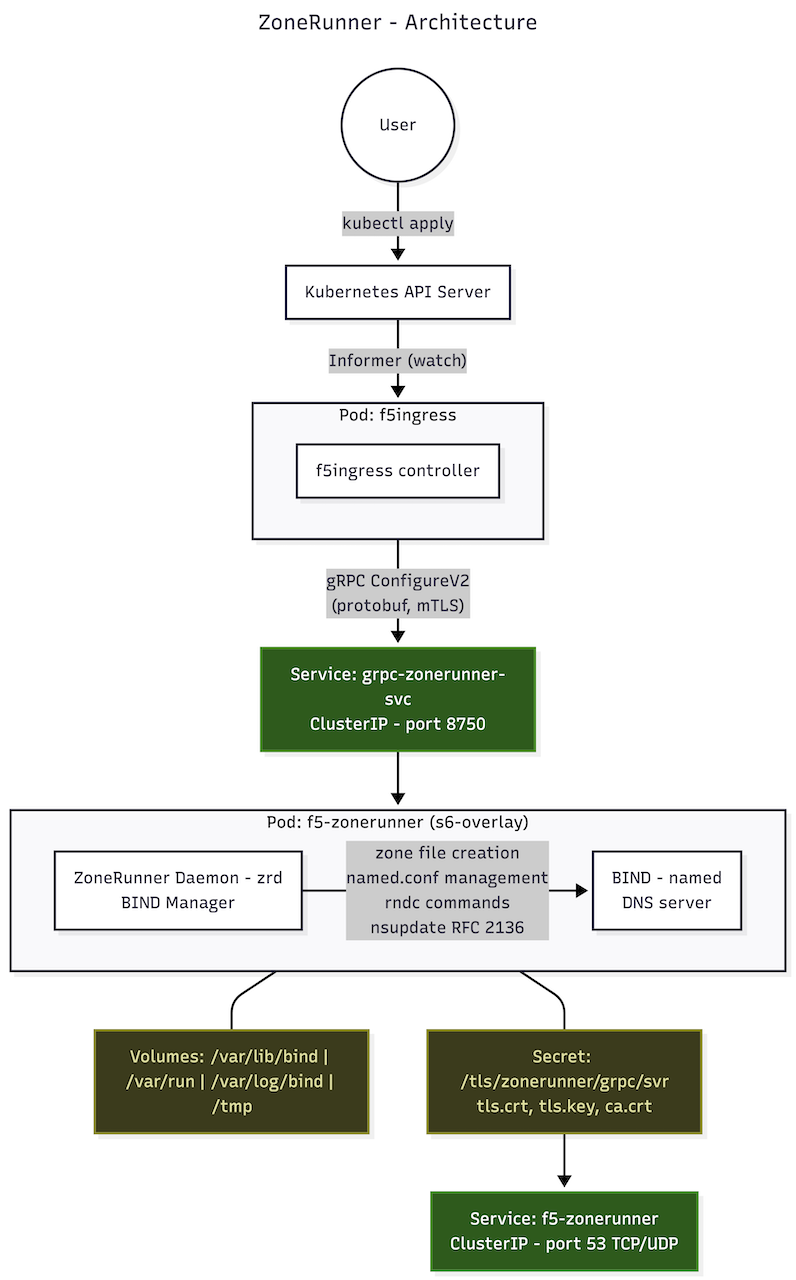
CRD resources
You define your desired DNS configuration by creating CRD (F5BigDnsLocalZone, F5BigDnsView, and F5BigDnsNamedOption) resources in your cluster. These CRDs are the only interface you use to manage ZoneRunner. When you create, update, or delete a CRD resource, the system detects the change and applies it automatically.
f5ingress controller
The f5ingress controller watches your CRD resources for changes. When it detects an update, it determines what changed and sends only the necessary updates to the ZoneRunner pod. This keeps updates fast and avoids rebuilding entire zones when only a few records changed.
If the f5ingress controller or the ZoneRunner pod restarts, the controller compares the current CRD state against what is already configured in BIND and applies only the differences. You don’t need to take any manual action after a restart.
ZoneRunner Daemon (zrd) and local BIND
The ZoneRunner pod runs two processes:
BIND DNS server — Serves DNS queries on port 53 using standard UDP and TCP. This is the authoritative DNS server that responds to queries for your zones.
ZoneRunner Daemon (zrd) — Receives configuration updates from the f5ingress controller and applies them to BIND. It manages zone files, DNS records, views, and server options.
Persistent storage
Zone data is stored on persistent volumes. This means your DNS zones, records, and configuration survive pod restarts without requiring a full rebuild. If you enable persistent volume claims (PVCs) in the Helm chart, zone data is preserved even if the pod is rescheduled to a different node.
If persistence.enabled is false, ZoneRunner uses hostPath at /var/data/zonerunner/bind. In that mode, data persists across pod restarts on the same node, but rescheduling to another node can result in missing zone data on the new node.
How updates flow through the system
You create or update a CRD resource using kubectl.
The f5ingress controller detects the change.
The controller determines what is different and sends the targeted update to the ZoneRunner Daemon.
The ZoneRunner Daemon applies the change to BIND.
BIND begins serving the updated DNS data immediately.
DNS queries continue to be served throughout this process. Updates do not cause downtime.
Use cases
Authoritative DNS hosting — Host authoritative DNS zones on your CNF infrastructure. Serve DNS records for internal or external domains directly from the F5 platform.
Zone transfers — Configure primary zones on CNF that serve as the source for secondary DNS servers outside the cluster using Authoritative Zone Transfer (AXFR) or Incremental Zone Transfer (IXFR).
Before you begin
To use ZoneRunner, you need:
A running CNFs deployment.
The
f5-zonerunnerHelm chart enabled in your deployment.The ZoneRunner CRDs (
F5BigDnsLocalZone,F5BigDnsView, andF5BigDnsNamedOption) installed in your cluster.
Manage DNS zones with ZoneRunner
This section explains how to manage authoritative DNS zones on CNF using ZoneRunner. You’ll use the F5BigDnsLocalZone CRD to create zones, add DNS records, update zone configuration, and delete zones.
Create a DNS zone
To create an authoritative DNS zone, define an F5BigDnsLocalZone resource and apply it to your cluster.
Create a YAML file for your zone.
The following example creates a primary zone for
example.comwith several DNS records:apiVersion: k8s.f5net.com/v1 kind: F5BigDnsLocalZone metadata: name: example-zone namespace: default spec: zoneName: example.com zoneType: primary viewName: default soaMname: ns1.example.com soaRname: admin.example.com soaRefresh: 28800 soaRetry: 7200 soaExpire: 604800 soaMinimum: 86400 soaSerialStrategy: increment records: - name: "@" type: NS ttl: 3600 rdata: "ns1.example.com." - name: "ns1" type: A ttl: 3600 rdata: "10.0.0.1" - name: "www" type: A ttl: 300 rdata: "10.0.0.100" - name: "mail" type: MX ttl: 3600 rdata: "10 mail.example.com." - name: "mail" type: A ttl: 3600 rdata: "10.0.0.200"
Apply the resource to your cluster.
kubectl apply -f example-zone.yaml
Verify that the zone was created.
kubectl get f5bigdnslocalzone example-zone
Add zone options
You can add BIND zone options to control behaviors like zone transfers, update permissions, and forwarding. Add them to the options field as an array of strings:
spec:
  options:
    - "allow-update { 10.0.0.0/8; 172.16.0.0/12; }"
    - "allow-transfer { 10.0.0.5; }"
    - "also-notify { 10.0.0.10; }"
    - "max-journal-size 10M"
Each string uses standard BIND configuration syntax.
Use a raw zone file if you prefer to provide a complete zone file instead of using the records field, set the zoneFile field in the CRD spec. When zoneFile is set, it overrides the soaMname, soaRname, and records fields.
spec:
  zoneName: example.com
  zoneType: primary
  zoneFile: |
    $ORIGIN example.com.
    $TTL 3600
    @ IN SOA ns1.example.com. admin.example.com. (
        0       ; serial (auto-set by ZoneRunner)
        28800   ; refresh
        7200    ; retry
        604800  ; expire
        86400   ; minimum
    )
    @ IN NS ns1.example.com.
    ns1 IN A 10.0.0.1
    www 300 IN A 10.0.0.100
Note
If you set the Start of Authority (SOA) serial to 0 in the raw zone file, ZoneRunner automatically replaces it with a date-based serial in YYYYMMDD00 format.
Choose a SOA serial strategy
The soaSerialStrategy field controls how ZoneRunner updates the SOA serial number when the zone changes. Choose one of the following strategies:
| Strategy | Description |
|---|---|
increment |
Auto-increments the serial on each update. Uses YYYYMMDDNN format, where NN resets daily. |
yyyymmddnn |
Sets the serial to the current date in YYYYMMDDNN format. |
unixtime |
Sets the serial to the current Unix timestamp. |
Update a DNS zone
To update a zone, edit the F5BigDnsLocalZone resource and apply the changes. ZoneRunner automatically detects what changed and sends only the updated records to BIND. You don’t need to rebuild the entire zone.
kubectl apply -f example-zone.yaml
Delete a DNS zone
To delete a zone, remove the F5BigDnsLocalZone resource. ZoneRunner removes the zone from BIND and deletes the associated zone files.
kubectl delete f5bigdnslocalzone example-zone
Supported DNS record types
The records field accepts records in standard BIND rdata format. Each record requires a name, type, and rdata value. If ttl is not set, the default value is 3600.
| Field | Description |
|---|---|
name |
The record name relative to the zone (use @ for the zone apex). |
type |
The DNS record type (A, AAAA, CNAME, MX, NS, TXT, SRV, etc.). |
ttl |
The Time to Live (TTL) in seconds (optional, default value is 3600). |
rdata |
The record data in standard BIND format. |
Configure DNS views for ZoneRunner
DNS views let you return different DNS responses based on where a query comes from. For example, you can create an “internal” view that returns private IP addresses for clients on your corporate network, and an “external” view that returns public IP addresses for all other clients.
You manage views on CNF by creating F5BigDnsView CRD resources.
Create a DNS view
Create a YAML file for your view. The following example creates an internal view that matches clients on private networks:
apiVersion: k8s.f5net.com/v1
kind: F5BigDnsView
metadata:
  name: internal-view
  namespace: default
spec:
  viewName: internal
  viewOrder: 10
  options:
    - "match-clients { 192.168.0.0/16; 10.0.0.0/8; }"
    - "match-destinations { any; }"
    - "recursion yes"
    - "allow-recursion { any; }"
Apply the resource to your cluster:
kubectl apply -f internal-view.yaml
Verify that the view was created:
kubectl get f5bigdnsview internal-view
Understand view evaluation order
BIND evaluates views in order. The first view whose match-clients criteria matches the query source is used. Set the viewOrder field to control the evaluation order:
Lower numbers have higher priority. A view with
viewOrder: 10is evaluated before a view withviewOrder: 20.The default
viewOrderis0.
Make sure you order your views so the most specific match criteria are evaluated first.
Assign zones to views
When you create a DNS zone using the F5BigDnsLocalZone CRD, set the viewName field to assign the zone to a specific view:
apiVersion: k8s.f5net.com/v1
kind: F5BigDnsLocalZone
metadata:
  name: internal-example-zone
  namespace: default
spec:
  zoneName: example.com
  zoneType: primary
  viewName: internal
  records:
    - name: "www"
      type: A
      ttl: 300
      rdata: "192.168.1.100"
If you don’t specify a viewName, the zone is assigned to the default view.
Update a DNS view
To update a view, edit the F5BigDnsView resource and apply the changes:
kubectl apply -f internal-view.yaml
Note
When you update a view, ZoneRunner replaces the entire view configuration in BIND and triggers a configuration reload. DNS queries continue to be served during the reload.
Delete a DNS view
To delete a view, remove the F5BigDnsView resource:
kubectl delete f5bigdnsview internal-view
Note
Deletion is not permitted while any F5BigDnsLocalZone continues to reference the view. Reassign or remove those zones before proceeding.
View options reference
The options field accepts standard BIND view configuration directives as an array of strings. Common options include:
| Option | Description |
|---|---|
match-clients |
Defines which client source addresses match this view. |
match-destinations |
Defines which destination addresses match this view. |
recursion |
Enables or disables recursive queries for this view. |
allow-recursion |
Specifies which clients can make recursive queries. |
Note
Only whitelisted BIND view-clause keywords are accepted by the admission webhook.
Configure BIND named options for ZoneRunner
ZoneRunner manages a local BIND DNS server on CNFs. You can customize the global named.conf options to control server-wide DNS behavior, such as caching limits, DNSSEC validation, and recursion settings.
Use the F5BigDnsNamedOption CRD to set these options.
Default BIND configuration
ZoneRunner starts BIND with the following default named.conf options:
options {
    directory "/var/lib/bind";
    listen-on port 53 { any; };
    listen-on-v6 port 53 { any; };
    allow-transfer { localhost; };
    masterfile-format text;
    recursion no;
    allow-new-zones yes;
    version "not disclosed";
    pid-file "/var/run/named/named.pid";
};

controls {
    inet 127.0.0.1 port 953 allow { 127.0.0.1; } keys { "rndc-key"; };
};
By default, ZoneRunner operates as an authoritative-only DNS server with recursion disabled.
Set global named options
Create a YAML file for your named options. The following example sets several global options:
apiVersion: k8s.f5net.com/v1
kind: F5BigDnsNamedOption
metadata:
  name: global-options
  namespace: default
spec:
  options:
    - "recursion no"
    - "dnssec-validation auto"
    - "max-cache-size 128M"
    - "max-ncache-ttl 300"
    - "allow-recursion { none; }"
Apply the resource to your cluster:
kubectl apply -f global-options.yaml
Verify that the options were applied:
kubectl get f5bigdnsnamedoption global-options
Each option string uses the format “name value”, where name is the BIND option name and value is the option value in standard BIND syntax.
Update named options
To change the options, edit the F5BigDnsNamedOption resource and reapply it:
kubectl apply -f global-options.yaml
ZoneRunner updates the named.conf file and triggers a BIND configuration reload. DNS queries continue to be served during the reload.
Delete named options
To remove custom options and return to the defaults, delete the F5BigDnsNamedOption resource:
kubectl delete f5bigdnsnamedoption global-options
Note
Deleting an F5BigDnsNamedOption resource removes options configured by the Custom Resource (CR). Canonical options are reset to the ZoneRunner defaults, while non-canonical options are removed and revert to the BIND default settings.
Commonly used options
| Option | Description | Example value |
|---|---|---|
recursion |
Enable or disable recursive DNS queries. | no |
dnssec-validation |
Set the DNSSEC validation mode. | auto |
max-cache-size |
Set the maximum size of the DNS cache. | 128M |
max-ncache-ttl |
Set the maximum TTL for negative cache entries. | 300 |
allow-recursion |
Specify which clients can make recursive queries. | { none; } |
The admission webhook allows a BIND options-clause subset and blocks unsafe keywords such as directory, include, pid-file, key-directory, managed-keys-directory, dump-file, memstatistics-file, statistics-file, bindkeys-file, and geoip-directory.