F5 Application Delivery Controller Solutions > BIG-IP Security Essentials > Middle Layer – Authentication and Protocol Hardening > Lab Source | Edit on
Multi-Factor Authentication
Multi-Factor Authentication (MFA) strengthens administrative access by requiring a second factor beyond username and password.
In the Middle Layer, MFA protects the authentication process by preventing credential-only administrative compromise. BIG-IP administrative authentication is delegated to a centralized AAA or identity provider (IdP) that enforces MFA for TMUI and SSH access paths.
Authentication answers the question:
Who are you?
Authorization (covered in the API Access Control lab) answers:
What are you allowed to do?
This mechanism is a critical Middle Layer identity control.
Executive Summary
Administrative access must require MFA whenever supported by enterprise identity infrastructure.
BIG-IP should delegate authentication to a centralized AAA or IdP that enforces MFA, while maintaining deterministic local fallback for break-glass recovery.
Threat Scenario
In the absence of MFA enforcement:
A stolen or phished password could grant administrative access.
Password reuse across systems could expose TMUI or SSH.
Credential stuffing could target management interfaces.
A compromised workstation could be used for lateral administrative access.
MFA reduces this risk by requiring a second authentication factor before administrative access is granted.
Objective
This lab will:
Review centralized MFA integration architecture
Examine BIG-IP remote authentication configuration options
Demonstrate safe configuration review without activation
Reinforce deterministic fallback principles
Validate break-glass account posture
Understand authentication vs authorization separation
Warning
Misconfiguration of remote authentication can result in administrative lockout.
Before enabling remote authentication in production:
Ensure console or SSH access is available.
Confirm a documented break-glass local administrator account exists.
Validate network reachability to the remote AAA server.
Test login before ending the session.
Hardened Enterprise Reference Design
The goal is to integrate BIG-IP administrative authentication with a centralized identity provider that enforces MFA.
Note
BIG-IP does not natively generate MFA challenges. It relies on the upstream AAA or identity provider to enforce MFA before returning an authentication decision.
BIG-IP can integrate with enterprise authentication services such as:
RADIUS
TACACS+
LDAP directory services (when upstream MFA is enforced)
SAML identity providers (administrative support depends on TMOS version and platform capability)
The reference design assumes MFA enforcement occurs at the upstream identity provider. BIG-IP consumes the authentication result and applies role mapping locally.
Recommended MFA Posture
Access Path |
Authentication Source |
Requirement |
|---|---|---|
TMUI (HTTPS/443) |
Centralized AAA / IdP |
MFA enforced by AAA / IdP |
SSH (TCP/22) |
Centralized AAA |
MFA or strong step-up policy |
Break-glass account |
Local (restricted) |
Stored securely, monitored, least use |
Note
In enterprise deployments, SSH access is typically integrated with TACACS+ or RADIUS backed by centralized identity infrastructure such as Active Directory with MFA enforcement.
Administrative Authentication Surface
Interface |
Port |
Authentication Source |
|---|---|---|
TMUI |
TCP 443 |
Local (Lab) / AAA (Prod) |
SSH |
TCP 22 |
Local (Lab) / AAA (Prod) |
Middle Layer Cohesion
Within the Middle Layer:
MFA protects administrative authentication.
TLS and Cipher Hardening protects administrative transport security.
API Access Control protects administrative authorization.
Together, these controls prevent credential abuse, transport downgrade, and privilege misuse.
Lab Environment Notice
This lab environment does not include a live RADIUS, TACACS+, LDAP, or SAML identity provider.
Remote authentication will NOT be activated.
This lab focuses on configuration review and architectural understanding, not activation of remote authentication.
Students will perform all steps on BIGIP-01 (10.1.1.5). BIGIP-07 is present in the environment but not used in this lab.
Students will:
Review configuration interfaces
Discuss enterprise integration requirements
Validate break-glass posture
Understand fallback behavior
Simulate authentication drift scenarios safely
GUI Configuration Procedure
Step 1 – Confirm Administrative Baseline
From the BIG-IP TMUI (10.1.1.5)
Log in to TMUI.
Navigate to System → Users → User List.
4. Confirm the presence of a documented local break-glass administrator. 6. Verify partition access and role assignments.
Students should observe:
Administrative users authenticate locally.
No centralized identity provider is configured.
Role assignment occurs directly on the user object.
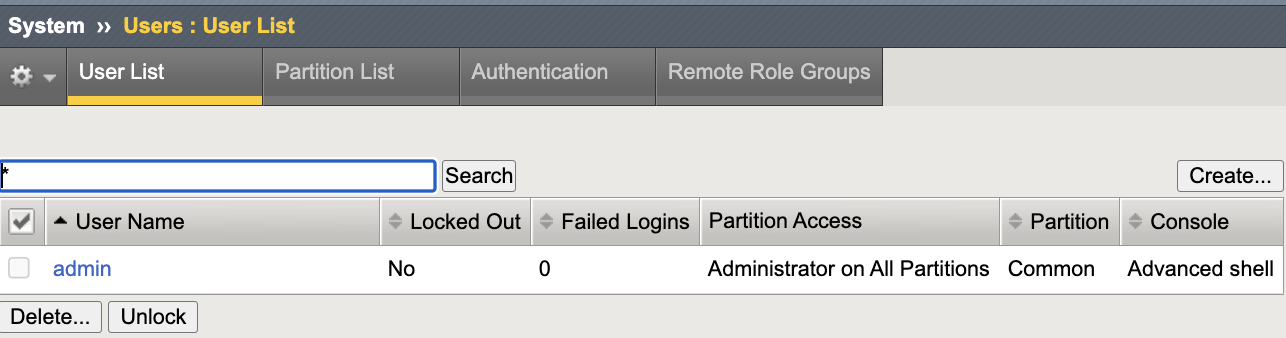
Baseline administrative users prior to centralized authentication integration.
Step 2 – Review Authentication Configuration Screen
Navigate to System → Users → Authentication.
Observe available authentication modes.
Review the following options:
Local
Remote – RADIUS
Remote – TACACS+
LDAP
SAML (where supported)
Do NOT change the authentication source in this lab.
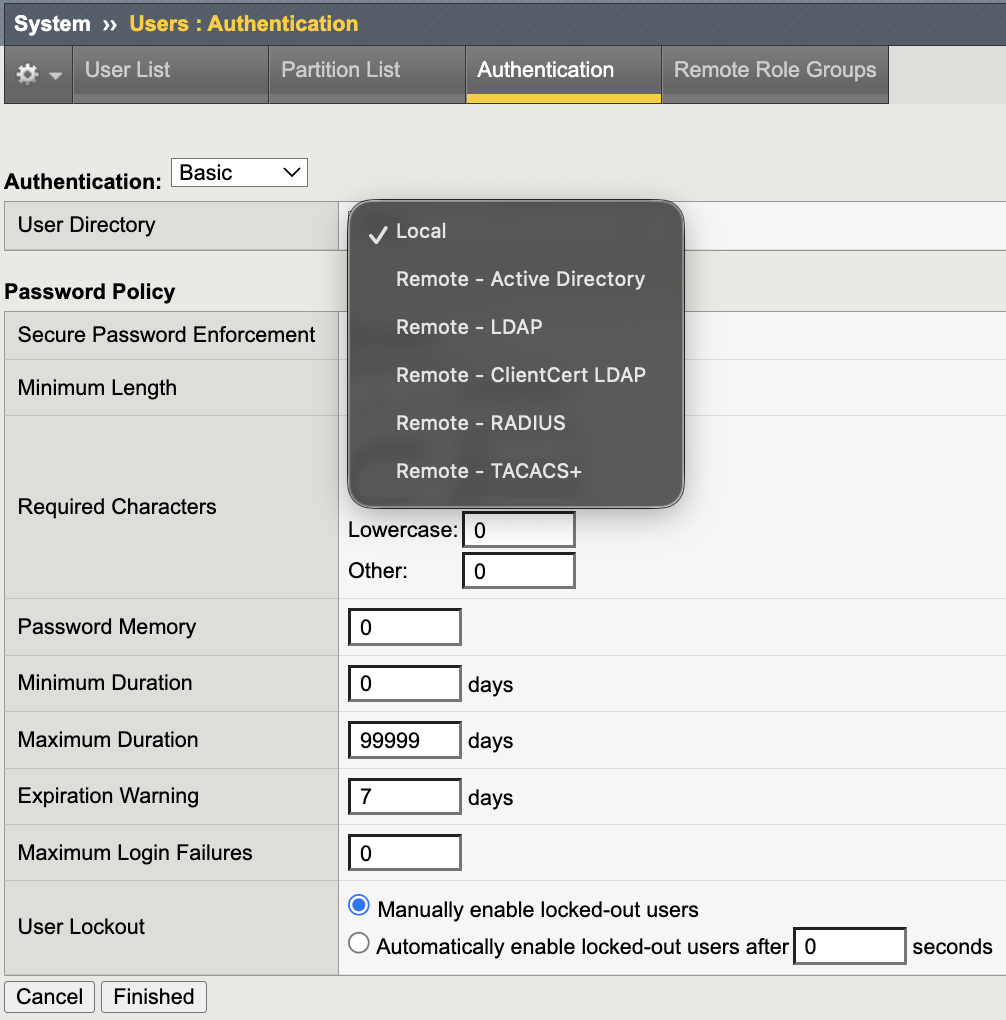
Baseline authentication mode set to Local.
Step 3 – Discuss Remote Authentication Requirements (Conceptual)
In a production environment, enabling Remote – RADIUS would require:
Confirmed reachability to the RADIUS server
Correct shared secret configuration
Remote role group mapping
Fallback to Local enabled
Successful login validation before session termination
If Remote authentication is enabled without reachable AAA infrastructure, administrators may lose access to TMUI and SSH.
Failure to validate reachability may result in administrative lockout.
Step 4 – Review Remote Role Groups Configuration
Navigate to System → Users → Remote Role Groups.
Click Create (do not save changes).
Review configuration fields:
Attribute String (e.g., RADIUS Class, TACACS+ privilege level, LDAP group membership, or SAML assertion)
Assigned Role
Partition Access
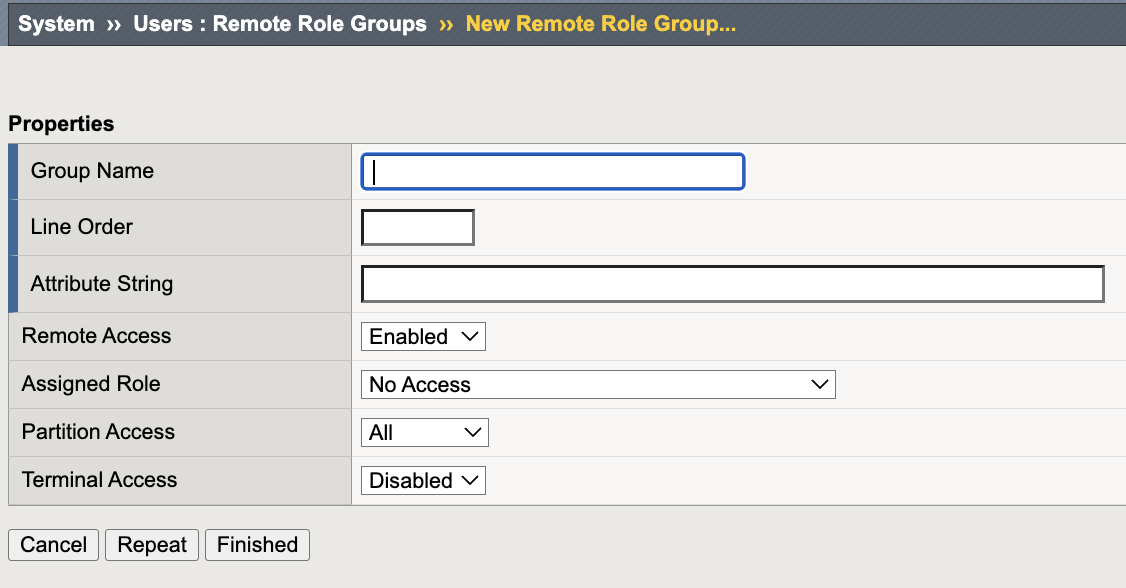
Remote Role Groups configuration interface used to map AAA attributes to BIG-IP administrative roles.
This configuration maps AAA-returned attributes to BIG-IP roles for dynamic authorization enforcement after successful authentication.
Note
No AAA attributes will be evaluated in this lab environment. This step is demonstrative only.
Verification (Conceptual Validation)
In a production deployment:
Administrative login is delegated to centralized AAA.
MFA challenge occurs upstream at the identity provider.
BIG-IP consumes the authentication result.
Role mapping is enforced dynamically.
In this lab:
Authentication remains local.
Role mapping configuration is reviewed.
Fallback principles are discussed conceptually.
Students should confirm the following:
Authentication source remains Local
No remote AAA servers are configured
Local administrator access is still functional
Instructor Notes
Instructor Guidance
Reinforce the following principles:
Always validate AAA reachability before enabling remote authentication.
Always configure deterministic fallback.
Always test login before ending configuration.
Remote authentication without reachability validation is operationally unsafe.
Lab Challenge – Authentication Drift Scenario
Scenario:
A local administrator account is being used instead of centralized MFA.
Student Tasks:
Identify a local administrator account that would bypass centralized MFA under System → Users.
Confirm it bypasses centralized authentication.
Restrict or document it as break-glass only.
Explain why local accounts must be restricted when centralized MFA is deployed.
Local accounts in MFA-enabled environments should be disabled, restricted, or documented strictly as break-glass access.
Success Criteria
Break-glass account documented
Authentication vs authorization distinction understood
Authentication screen reviewed
Remote authentication risks understood
Fallback behavior explained correctly
Centralized MFA integration architecture understood