F5 Application Delivery Controller Solutions > TMOS - Performance Tuning > Lab 3: Layer 7 LB for HTTP and UDP Source | Edit on
Task 2: OneConnect Summary
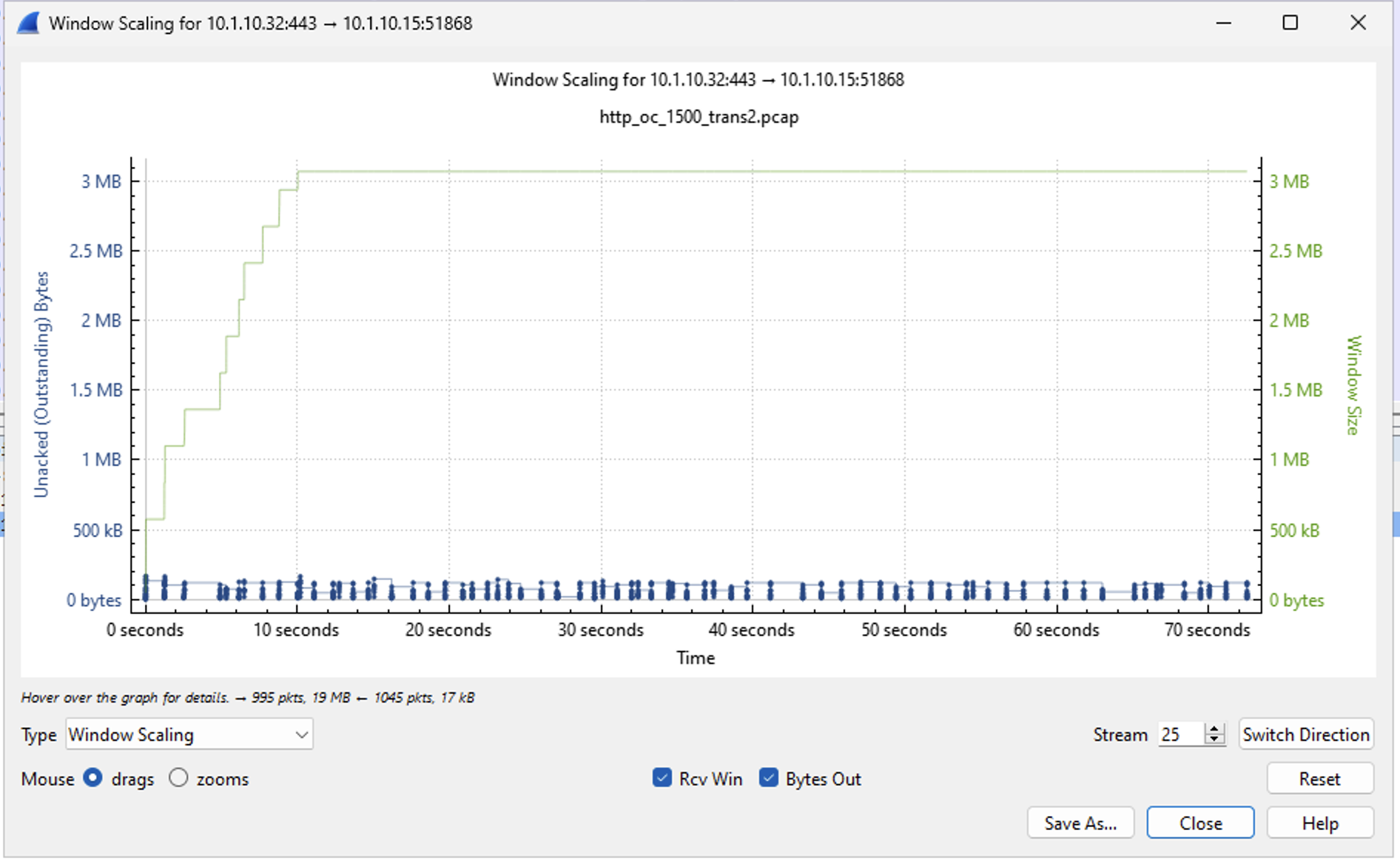
The typical use for a OneConnect profile is to reduce TCP connection time by re-using idle TCP connections. In most cases, the lan-side TMOS to pool member TCP 3-way handshake is less than 1ms. This doesn't look like much at first. There is a lot of back and forth with TCP after the 3-way handshake in setting up Window Sizes, Slow Start, Congestion control etc. Most of negotiaions happen near the start of a connection unless there is congestion/packet loss somewhere during the flow causing a reduction in TCP Window size. You will see the benefit of a re-used connection in the graphs below.
There will also be a TMOS memory savings with the connection re-use but 3-way handshake time reduction will be small. The TCP connection re-use may also help in environments where the application servers are unable to support a large number of active connections.
Another time savings comes from re-using idle pool member TLS connections. In this lab environment, the typical TLS handshake is 18ms. Saving 18ms per connection can be important when you scale that up to many thousands of connections per second. The net time savings will vary based on connection rate and concurency.
Here are some connection re-use numbers from the lab:
---------------------------------------
Ltm::OneConnect Profile: lab_OneConnect
---------------------------------------
Virtual Server Name   N/A

Connections
Current Idle         23
Maximum              23
Total Reuses       1477
New                  23
These numbers are the result of a 1500 HTTPS transaction test with each creating a new client-side and server-side TCP connection. The concurency rate was around 23 during the test. Starting with zero idle TCP connections, 23 new TCP connections were opened to the servers with 1477 connections being re-used during the entire test.
Here are some of the time and packet savings from the same 1500 transaction test with and without OneConnect:
No OneConnect Profile Assigned
    Total Packets:  145,431
    Client Packets: 76,515
    Server Packets: 68,916
    Total Time:     76.13s
    Server Time:    74.12s

With OneConnect Profile Assigned
    Total Packets:  121,529
    Client Packets: 78,290
    Server Packets: 43,239
    Total Time:     75.21s
    Server Time:    70.17s
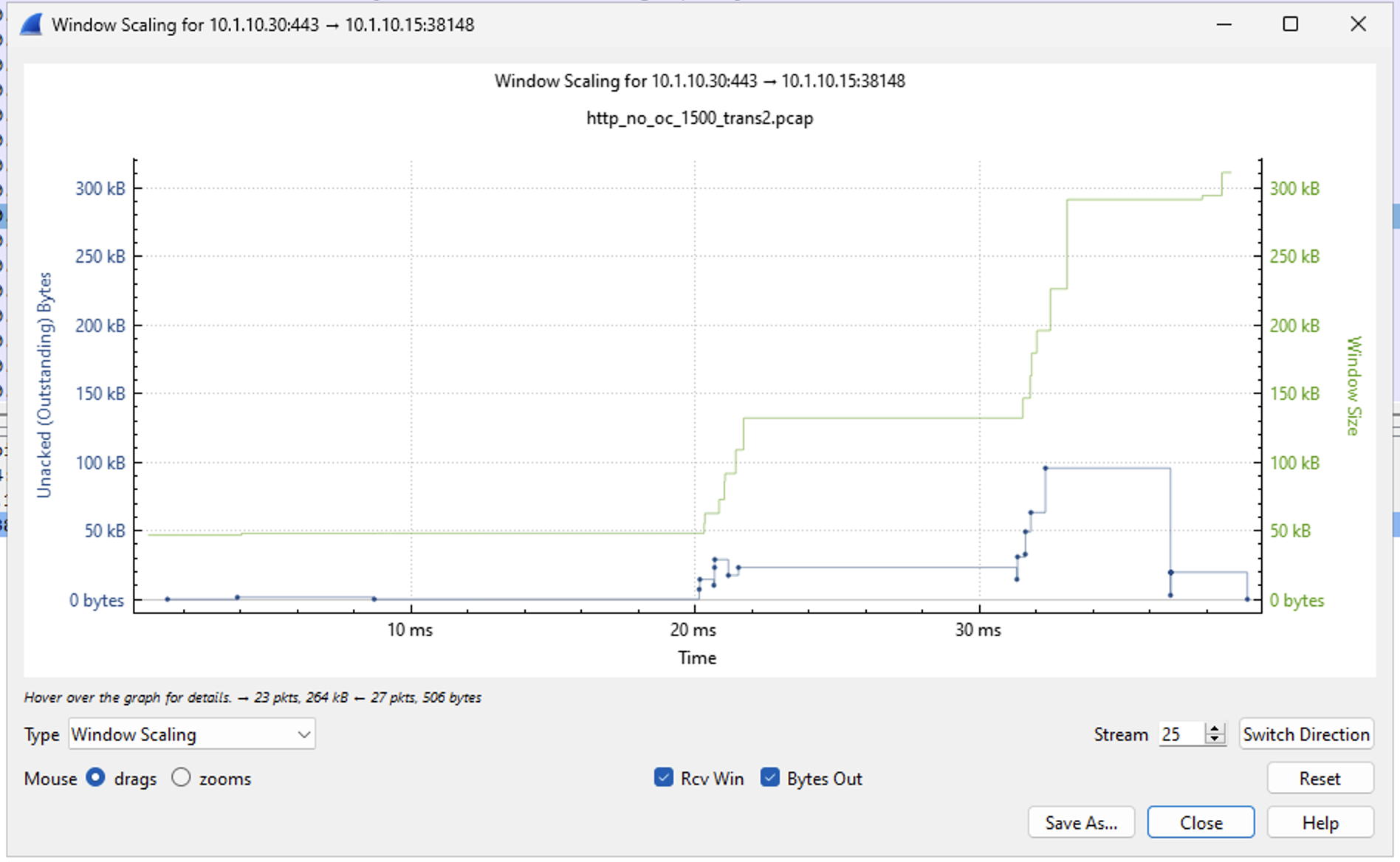
There is a reduction in server-side packet count due to 1477 fewer TCP and TLS handshakes. The packet count is also reduced from the TCP Window staying large during the re-used connections. For this test, the server-side connections were open for around 70s eliminating most of the TCP ramp up delays from individual server-sde connections. Contrast that with the server-side connection durations and ramp up shown without OneConnect below. The 3MB buffers are not needed for the small 256KB files being transferred but the tcp_3mb TCP Profile from earlier tasks was left in place for configuration simplicity.
Without OneConnect, the server-side connections are only active for the length of a single client request - around 38ms for the 256KB requests in the test. The server-side connections are not open long enough for the TCP Window size to fully open to 3MB and each new connection restarts the ramp up process.
With OneConnect enabled, it is like being able to jump on a train moving at full speed without it having to stop and pick you up.