F5 Application Delivery Controller Solutions > BIG-IP Security Essentials > Outer Layer – Boundary and Access Isolation > Lab Source | Edit on
IP Allowlisting
IP Allowlisting restricts administrative access to the BIG-IP device based on source IP address. Only explicitly approved management and monitoring systems should be able to initiate connections to the BIG-IP management interface (OOB management), not data-plane Self IPs.
This mechanism is a critical Outer Layer boundary control.
Executive Summary
Administrative access must be restricted by explicit source IP. Broad internal access (e.g., 10.0.0.0/8) undermines segmentation and should not be permitted without explicit risk acceptance.
IP Allowlisting complements Self IP Port Lockdown by controlling who may access management services, while Port Lockdown controls where those services are exposed.
Threat Scenario
In the absence of IP allowlisting:
A compromised internal host could attempt SSH brute-force access to the BIG-IP management IP.
A flat enterprise network could allow unintended access to TMUI.
Monitoring services (SNMP) could be queried from unauthorized segments.
Lateral movement within the network could reach the control plane.
IP Allowlisting reduces this risk by ensuring only explicitly approved administrative and monitoring systems can reach management services.
Objective
This lab will:
Identify management-plane exposure
Restrict SSH access by source IP
Restrict SNMP access to monitoring systems
Validate unauthorized access attempts are blocked
Hardened Enterprise Reference Design
Note
IP Allowlisting should exist at multiple layers: upstream firewall enforcement and device-level enforcement.
Recommended Administrative Posture
Source |
Destination |
Service |
Action |
|---|---|---|---|
Authorized Admin |
BIG-IP Mgmt IP |
SSH (22) |
Permit |
Authorized Admin |
BIG-IP Mgmt IP |
HTTPS (443) |
Permit |
Monitoring Systems |
BIG-IP Mgmt IP |
SNMP (161) |
Permit |
Any |
BIG-IP Mgmt IP |
Mgmt Ports |
Deny |
Administrative Services of Concern
Port |
Service |
|---|---|
TCP 22 |
SSH |
TCP 443 |
TMUI / HTTPS |
UDP 161 |
SNMP |
TCP 4353 |
iControl REST / big3d (if required) |
Warning
Allowing entire RFC1918 ranges defeats the purpose of allowlisting. Only explicitly approved administrative systems should be permitted.
Lab Procedure
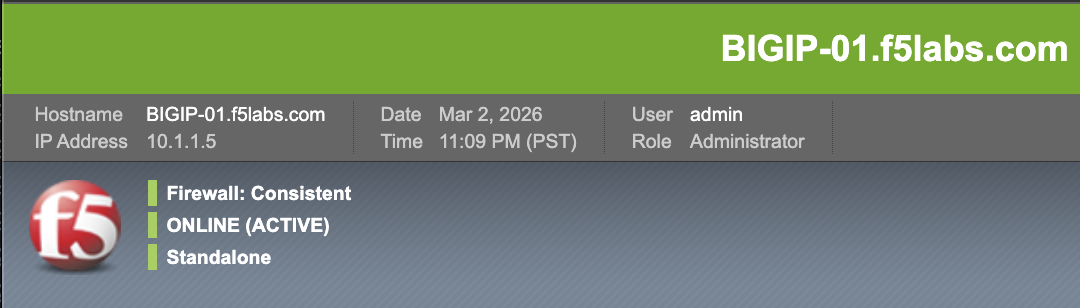
Step 1 – Identify Management IP
Log in to the BIG-IP Configuration Utility.
Locate the Management IP displayed in the upper left corner.
In this lab environment the BIG-IP management IP is:
10.1.1.5
Step 2 – Inspect SSH Access Scope
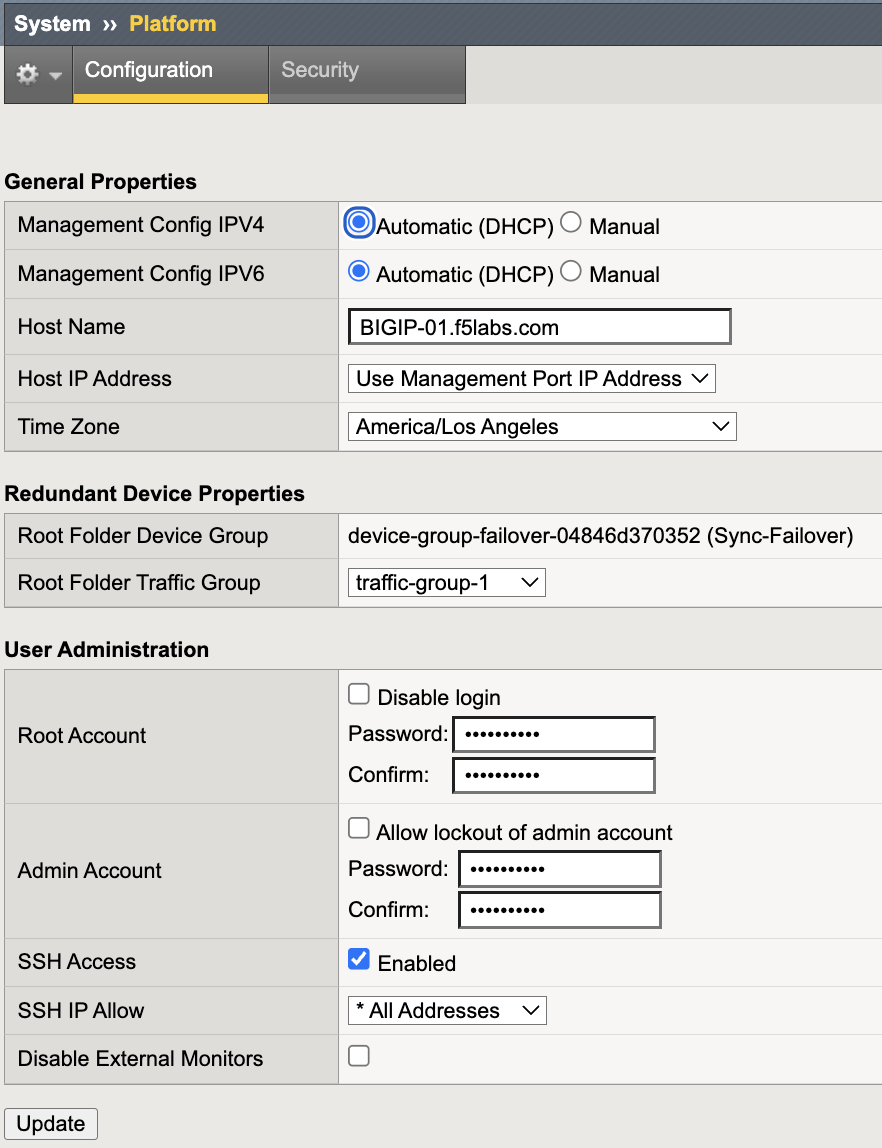
Navigate to System → Platform → Configuration.
Scroll to SSH Access.
Review the SSH IP Allow configuration.
If configured broadly (for example 0.0.0.0/0 or a large internal range),
administrative access may be overly permissive.
Note
SSH IP Allow applies to the management interface. Self IP administrative exposure is controlled separately using Self IP Port Lockdown.
Step 3 – Restrict SSH to the Authorized Jumphost
Under SSH IP Allow, select Specify Range.
Enter the authorized administrative Jumphost:
10.1.1.4
Click Update.
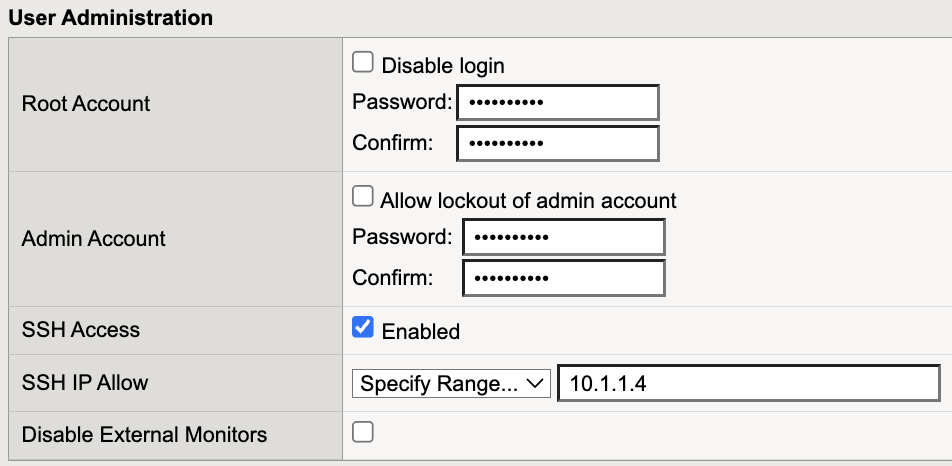
SSH access is now restricted to the authorized administrative host.
Step 4 – Validate Authorized SSH Access
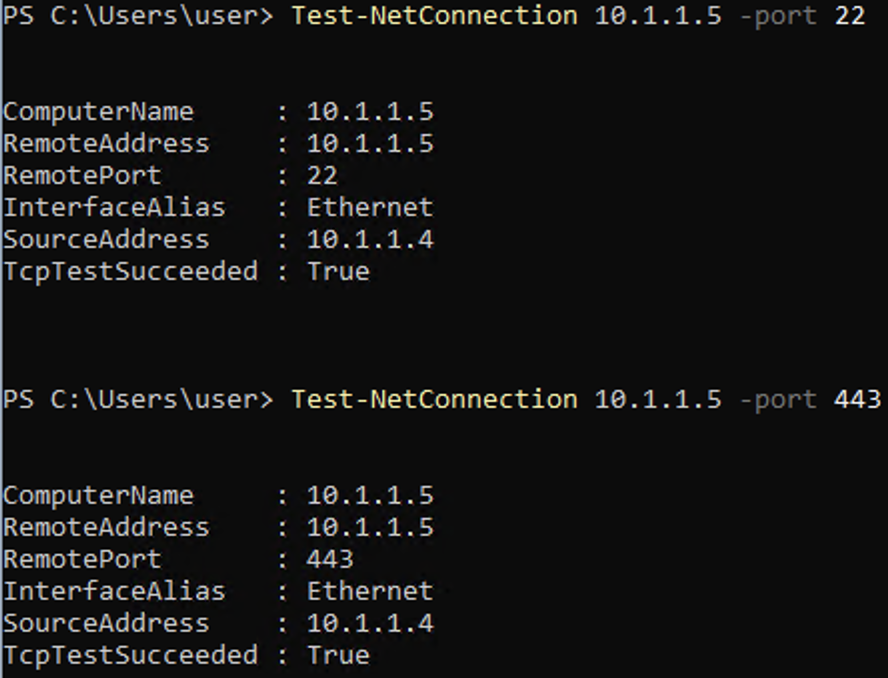
Execution Context:
Host: Windows Jumphost (10.1.1.4)
Network Interface: Management Network (10.1.1.0/24)
Powershell
Run the following commands:
Test-NetConnection 10.1.1.5 -Port 22
Test-NetConnection 10.1.1.5 -Port 443
Expected:
TcpTestSucceeded : True
Step 5 – Validate Unauthorized Access Blocked
Execution Context:
Host: App Services & Traffic Generation system (10.1.1.9)
Network: Non-authorized administrative host
Webshell
This test must be performed from a non-authorized host.
In this lab environment we will use the App Services & Traffic Generation system (10.1.1.9).
Access the host as follows:
In the UDF environment, locate App Services & Traffic Generation.
Click ACCESS.
Select WEB SHELL.
This opens a terminal session directly on the App Services host.
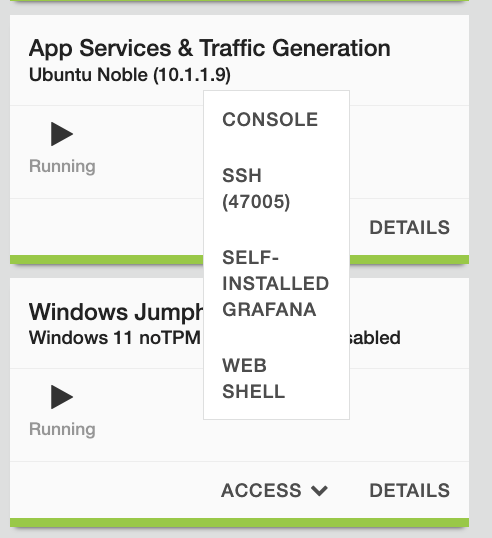
Run the following command:
ssh admin@10.1.1.5
Expected result:
Connection timed out
Connection refused

This confirms that SSH access is restricted to approved administrative systems.
Validation Summary
After remediation:
SSH restricted to the authorized administrative host
HTTPS reachable only from approved administrative sources
SNMP restricted to monitoring systems
Unauthorized hosts blocked at the management interface
Outer Layer Alignment
IP Allowlisting protects:
Who may access management services.
Self IP Port Lockdown protects:
Where management services are exposed.
Together they enforce:
Least privilege
Deterministic administrative access paths
Control-plane isolation
Zero Trust segmentation principles
Success Criteria
Only the authorized administrative host (10.1.1.4) can access SSH
Unauthorized hosts cannot reach management services
SNMP access restricted to approved monitoring systems
No broad internal ranges permitted
Management access remains operational for approved sources