F5 BIG-IP SSL Orchestrator Training Lab > All SSL Orchestrator Lab Guides > SSLO 203: F5 BIG-IP SSL Orchestrator: Plug, play, automate (AppWorld 2026 | 2 hours) > 3. Lab 2: DNS-over-HTTPS (DoH) Guardian Source | Edit on
3.3. Implement DoH Guardian
We have confirmed the DoH Guardian configuration objects were successfully added to BIG-IP SSL Orchestrator. We now configure the existing L3 Outbound Proxy to use the new service.
- During this lab, we will perform the following actions:
Review the doh-guardian-rule to see the various controls available.
Add the DoH Guardian Service to the existing Service Chain
Configure Firefox in the Ubuntu-Client to use Google's DoH server.
Test the DoH Guardian Service Extension running a tail command on the BIG-IP LTM Logs, then go to any site using the DoH configured Firefox browser in the Ubuntu-Client.
Enable the blackhole mode on the Doh Guardian iRule to block any DoH requests that are categorized as Sports.
3.3.1. Review the DoH Guardian iRule: doh-guardian-irule
Go to the BIG-IP SSL Orchestrator GUI tab and navigate to Local Traffic > iRules and click on the doh-guardian-irule iRule to view the contents.
Note
Please do not modify the iRule at this time. Review the notes and comments in each section to understand the functionality of the iRule.
Look at lines 40 - 44, and 54 - 58. These are the sections that control blackhole and sinkhole mode. For this portion of the lab, we will use the blackhole feature. We will use the other feature in the next lab.
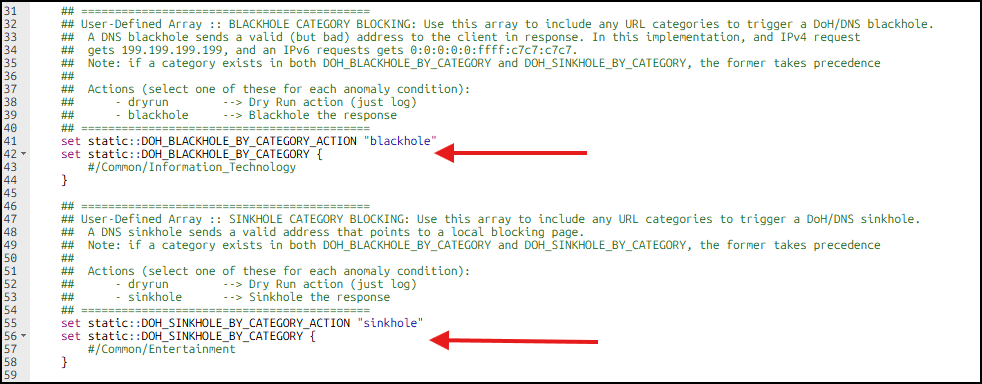
As you can notice, the remaining portions of this 567 line iRule is extensive. However, it was designed in a way to be easy to modify and change the behavior.
The first section of the iRule is the RULE_INIT section (lines 6 - 110), and contains the explanations and configurable settings for this Service Extension.
The second section (lines 111 - 567) is the iRule logic that acts on the settings within the RULE_INIT section.
3.3.1.1. All the doh-guardian-rule editable settings:
- DOH_LOG_LOCAL:
Enables or disables local (/var/log/ltm) logging of DoH requests and events. (1=on, 0=off)
- DOH_LOG_HSL:
Defines a high-speed logging pool to send logs to external SIEM. (pool name)
- DOH_CATEGORY_TYPE:
Defines the category database to use, subscription, custom, or both. (string selection)
- DOH_BLOCKING_BASIC:
Enables or disables basic DoH blocking. This option is mutually exclusive and simply blocks all detected DoH requests. (1=on, 0=off)
- DOH_BLACKHOLE_BY_CATEGORY:
Defines the list of categories that will trigger a DoH blackhole action. (category list)
- DOH_BLACKHOLE_BY_CATEGORY_ACTION:
Allows for the default blackhole action, or a dryrun (logging) action. (string selection)
- DOH_SINKHOLE_BY_CATEGORY:
Defines the list of categories that will trigger a DoH sinkhole action. (category list)
- DOH_SINKHOLE_BY_CATEGORY_ACTION:
Allows for the default sinkhole action, or a dryrun (logging) action. (string selection)
- DOH_SINKHOLE_IP4:
Defines the IP4v address that will be used for the sinkhole action on A requests. (ipv4 address)
- DOH_SINKHOLE_IP6:
Defines the IP4v address that will be used for the sinkhole action on AAAA requests. (ipv6 address)
- DOH_ANOMALY_DETECTION:
Enables or disables anomaly detection. (1=on, 0=off)
- DOH_ANOMALY_CONDITION_LONG_DOMAIN:
Defines the long subdomain anomaly detection, by virtue of a max character length setting (integer, default=52 characters).
- DOH_ANOMALY_CONDITION_LONG_DOMAIN_ACTION:
Defines the action to be taken on the long subdomain anomaly: dryrun, drop, blackhole, or sinkhole. (string selection)
- DOH_ANOMALY_CONDITION_UNCOMMON_TYPE:
Defines the uncommon query type anomaly detection, by virtue of a list of uncommon types. (DNS record type list)
- DOH_ANOMALY_CONDITION_UNCOMMON_TYPE_ACTION:
Defines the action to be take on the uncommon type anomaly: dryrun, drop, blackhole, or sinkhole. (string selection)
3.3.2. Add the DoH Guardian Service to the existing Service Chain
Now that we have confirmed the DoH Guardian configuration objects were successfully added to BIG-IP SSL Orchestrator, we will add the DoH Guardian Service to the existing Service Chain.
Go to the BIG-IP SSL Orchestrator GUI tab in your web browser and navigate to SSL Orchestrator > Configuration.
Click on Service Chains and then click on the ssloSC_combined_chain Service Chain.
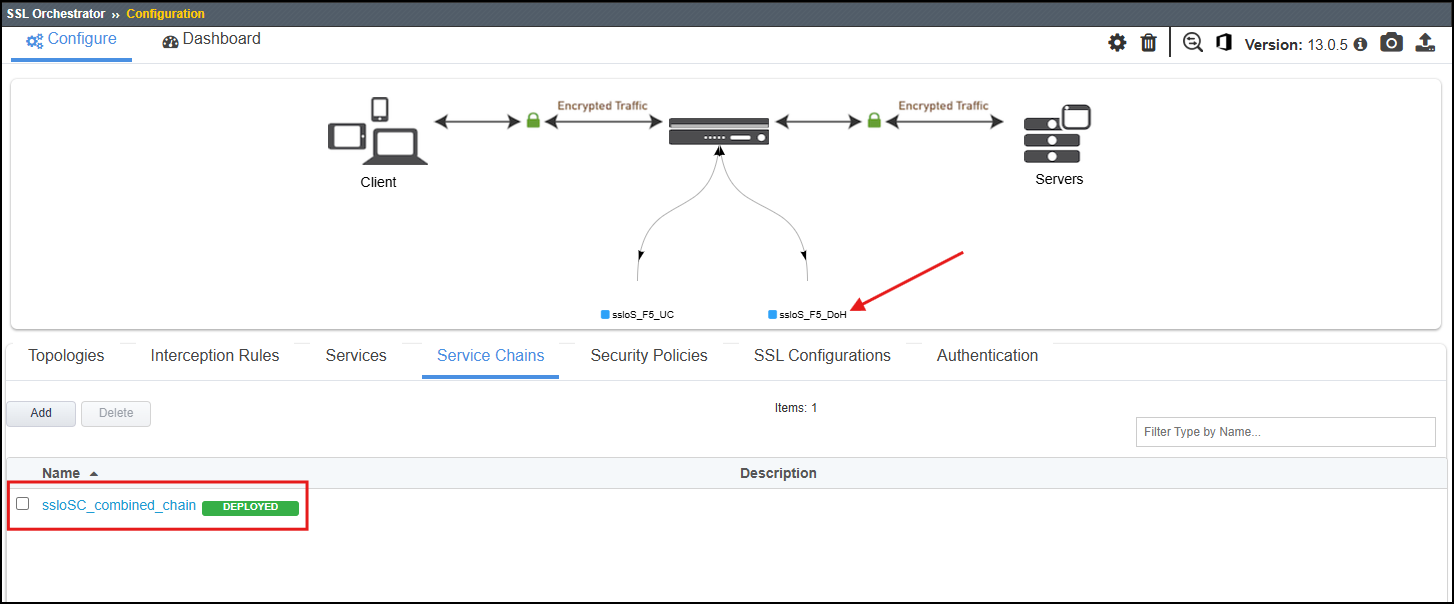
Double click the ssloS_F5_DoH in the Services Available list to add it to the Selected Service Chain Order.
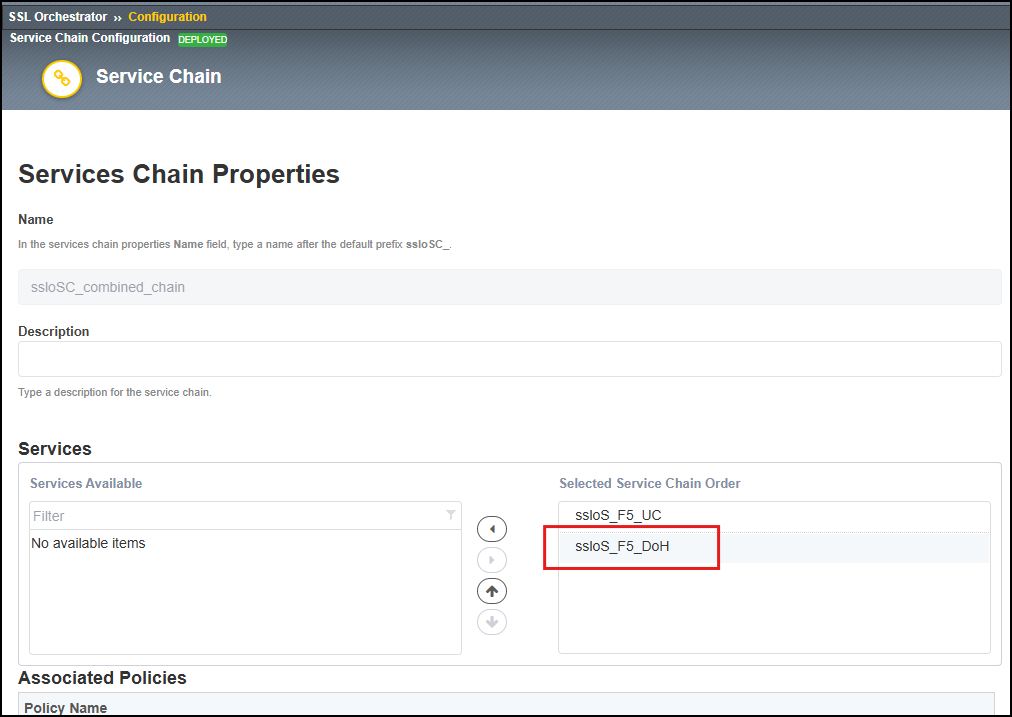
Click Deploy then OK (possibly twice) to confirm the changes.
3.3.3. Configure the Firefox browser in the Ubuntu-Client to use Google's DoH server
Go to the Ubuntu-Client GUI tab in your web browser and open up the Firefox Browser.
In the Firefox Browser, click on the Settings icon (three horizontal lines) and then click on Settings.
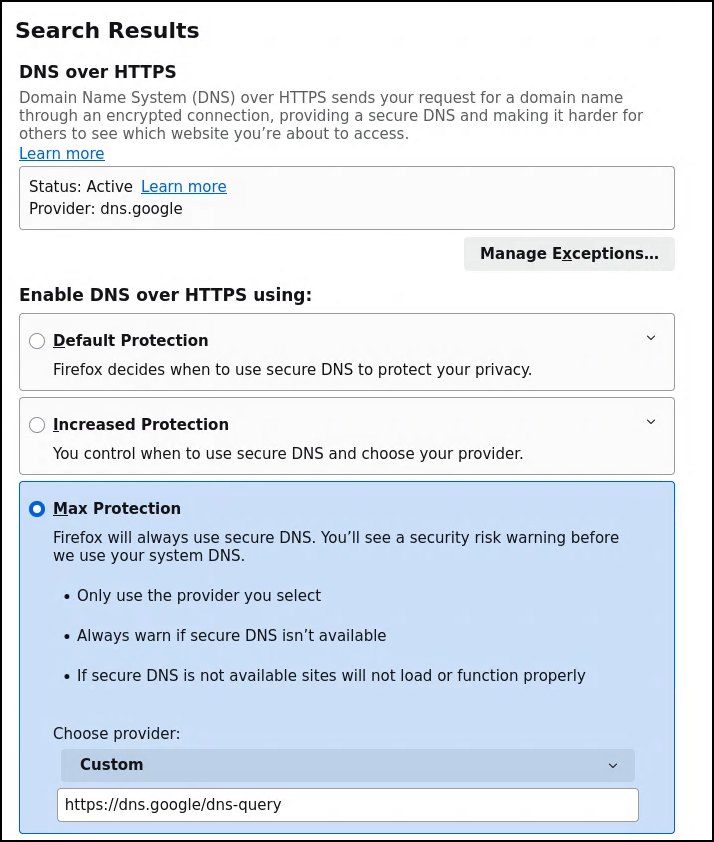
In the Find in Settings search box, type DoH, and it will display the following:
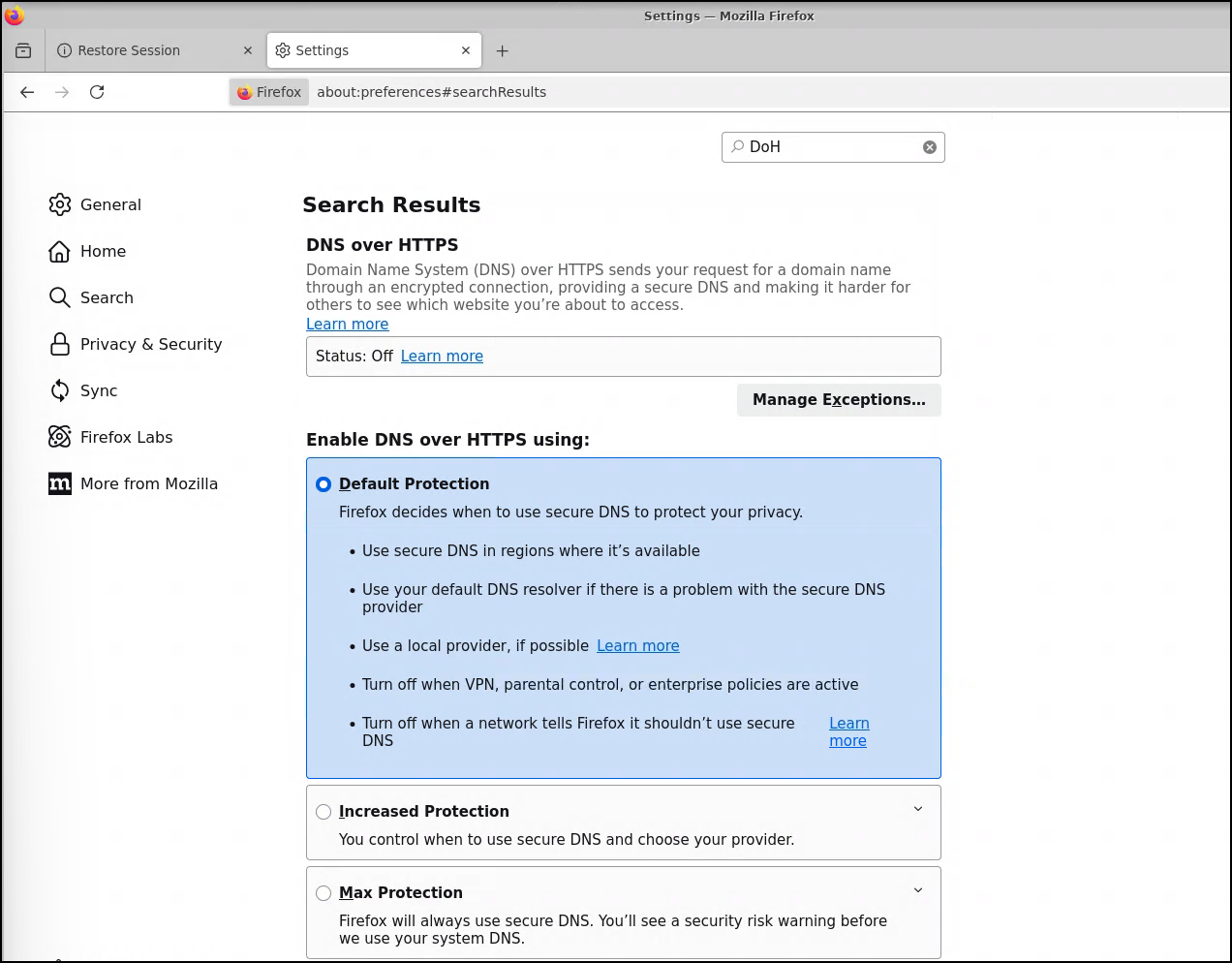
In order to force all browsing to use DNS-over-HTTPS, click the Max Protection radio button.
In the Choose provider text box, type the following:
https://dns.google/dns-query
After inputting the Google DNS provider, you should see the Status change to Active and the Provider Name change to dns.google.
After configuring, close and reopen Firefox.
Take a moment to browse to any website to confirm that DNS changes we made to the browser didn't break anything. Additionally, this generates DoH requests to the /var/log/ltm logs we are about to review.
3.3.4. Test the DoH Guardian Service Extension logging functionality
So far, we have inspected the doh-guardian-irule, added the ssloS_F5_DoH Service to the existing Service Chain, and setup Firefox to use Google's DoH server for all DNS queries.
This lab is automatically configured to log all DNS-over-HTTPS requests to the local log file (/var/log/ltm).
Go back to your BIG-IP SSL Orchestrator in your UDF Environment and open the Web Shell. From there you can view the running logs with the following command.
tail -f /var/log/ltm
You should see a few entries in the logs since we closed and reopened Firefox and surfed to a couple site.

Note
Please let an instructor know if you do not see any logs.
To breakdown the log entries, it's going to log the following information:
Client IP Address
DoH Server IP Address
query name
query type
version & id
URL category
Leave the Web Shell tab open, as we will come back to it in a moment.
3.3.5. Enable the DoH blackhole feature
By definition, a DNS blackhole essentially diverts a DNS client to nothing. A DNS blackhole will either drop the request entirely or respond with an NXDOMAIN. However, a browser that fails in getting a DoH response will almost always retry with regular DNS, making this a less effective option for blocking DoH queries. To properly blackhole a DoH request, the client must receive an actual response, but to something that does not exist.
In this implementation, a DoH blackhole responds to the client with either a 199.199.199.199 IPv4 address for an A request, or 0:0:0:0:0:ffff:c7c7:c7c7 IPv6 address for a AAAA request.
Let's enable blackhole feature to block any DoH requests that are categorized as Sports.
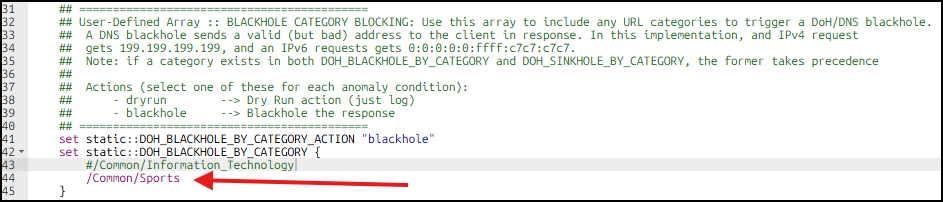
Start by opening the doh-guardian-rule in the Local Traffic > iRules > iRule List, create a new line after line 43 and add the following:
/Common/Sports
It should look like this after you make the changes:
Go to the bottom of the page and click Update.
Note
Please let an instructor know if any errors are displayed.
Go back to the Ubuntu-Client GUI tab in your web browser and close and reopen the Firefox Browser.
Now that we have setup blocking for the the Sports URL category, let's try to access a website that is categorized as such.
www.nfl.comwww.nba.com
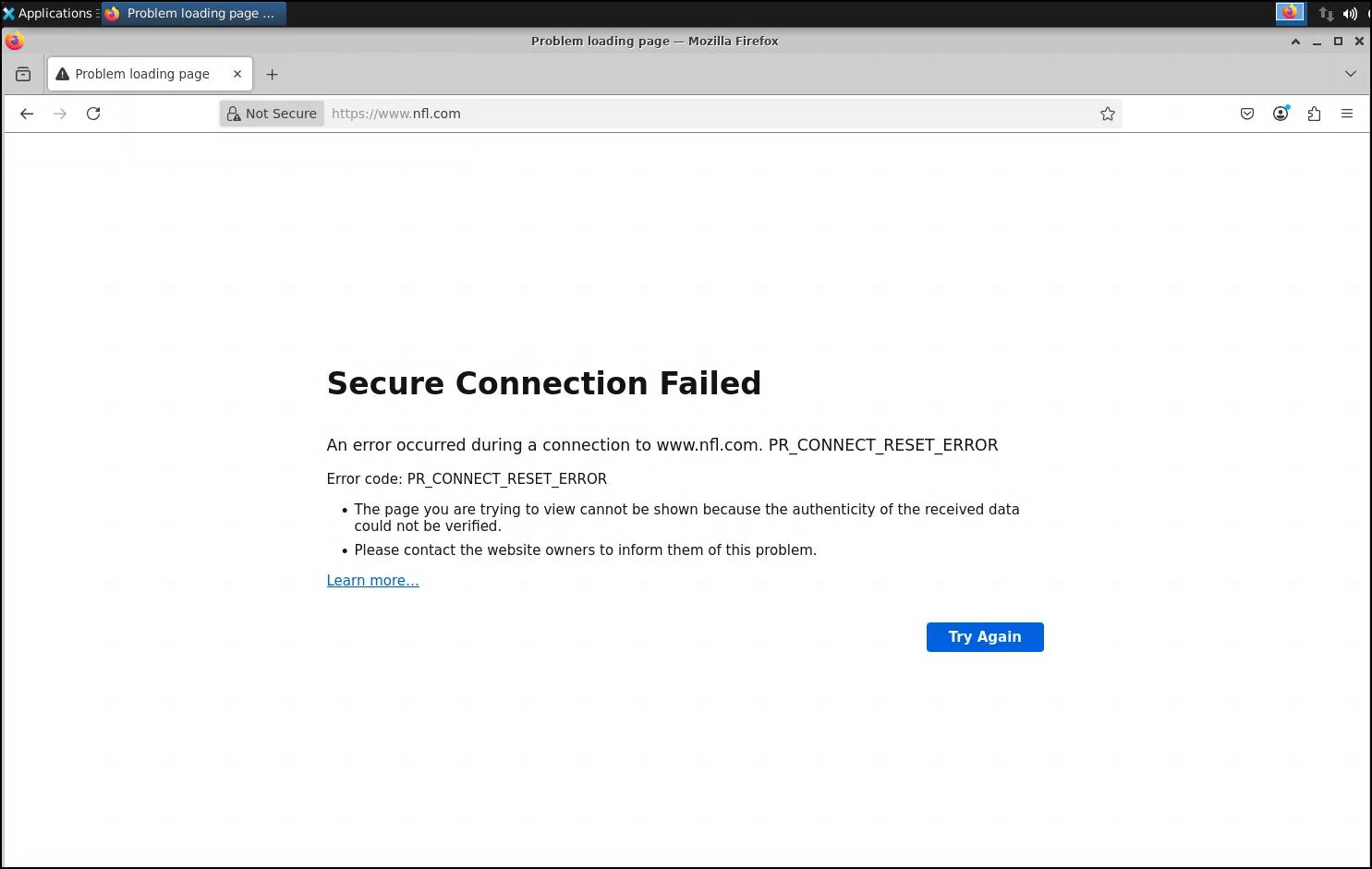
Since we sent all requests in the Sports category to the blackhole, you should see something similar to a Reset Error in Firefox.
Go back to the Web Shell tab and scroll up to find the blackhole log entry. You should see something similar to the following:

3.3.6. Conclusion
With the completion of this portion, please continue to the next lab to implement the sinkhole mode on the DoH Guardian Service.