F5 BIG-IP SSL Orchestrator Training Lab > All SSL Orchestrator Lab Guides > SSLO 203: F5 BIG-IP SSL Orchestrator: Plug, play, automate (AppWorld 2026 | 2 hours) > 3. Lab 2: DNS-over-HTTPS (DoH) Guardian Source | Edit on
3.5. Test the DoH Guardian Sinkhole Functionality
With everything configured, we will now test the DoH Guardian Sinkhole Functionality within a browser and the CLI.
Open the Ubuntu-Client WEBRDP session.
If the Firefox browser is not open, open it and navigate to
https://www.f5.com.Observe that the browser is able to resolve the domain name and connect to the website.
Now let's navigate to a site that is categorized as Sports or Entertainment.
From the Firefox browser, navigate to the following URLs and observe the change that occur.
https://www.nfl.com
https://www.nbc.com
If setup correctly, the browser should display a blocking page.
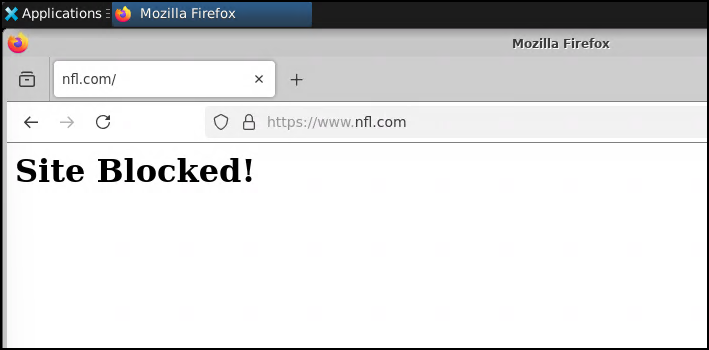
You can also test the DoH Guardian Sinkhole Functionality from the CLI.
Open the Terminal Emulator icon on the bottom menu.
Run the following commands (use Shift-Ctrl-V for Windows, and Option-Shift-Command-V for Mac)
curl -k --doh-insecure --doh-url https://dns.google/dns-query https://www.nbc.com
curl -k --doh-insecure --doh-url https://dns.google/dns-query https://www.nfl.com
Note
The --doh-insecure command requires Curl 7.76.1 and higher
If setup correctly, the CLI should display the blocking response.

3.5.1. Results & Additional Blocking Options
The result of both tests above should be the "Site Blocked!" page with a certificate forged by SSL Orchestrator. Injecting a static HTML response blocking page is just one option among many. You could, for example, issue a redirect instead of static HTML, and send the client to a more formal "splash page". This redirect could inject additional metadata to provide to the splash page.
You would need to modify the sinkhole-target-rule iRule to issue a redirect instead of static HTML.
This is an example of a redirect to a splash page that includes additional metadata:
when HTTP_REQUEST { HTTP::redirect "https://splash.f5labs.com/?cats=gis-dns-block&client_ip=[IP::client_addr]&type=dns&url=[URI::encode [b64encode [HTTP::host]]]" }