OpenShift
Overview of OpenShift
RedHat OpenShift is the Kubernetes platform that provides a foundation for on-premises, hybrid, and multi-cloud deployments. With automated operations and streamlined life-cycle management, OpenShift empowers development teams to build and deploy new applications and helps operations teams provision, manage, and scale a Kubernetes platform.
See also
- OpenShift 4.12 and F5 BIG-IP Container Ingress Services (CIS) User-Guide for Standalone BIG-IP using OVN-Kubernetes iCNI with NO Tunnels
- OpenShift 4.12 and F5 BIG-IP Container Ingress Services (CIS) User-Guide for High Availability BIG-IP using OVN-Kubernetes iCNI with NO Tunnels
- OpenShift 4.8 and F5 BIG-IP Container Ingress Services (CIS) User-Guide for Standalone BIG-IP using OVN-Kubernetes Advanced Networking
- Configuration Steps
- Create a BIG-IP VXLAN tunnel for OVN-Kubernetes Advanced Networking
- Create a partition on BIG-IP for CIS to manage
- Create CIS Controller, BIG-IP credentials, and RBAC Authentication
- Add OVN-Kubernetes advanced networking CNI specific annotations
- Installing the Demo App in OpenShift and validate the OVN-Kubernetes advanced networking annotations
- Create Route for Ingress traffic to Demo App
- OpenShift 4.8 and F5 BIG-IP Container Ingress Services (CIS) User-Guide for Cluster BIG-IP using OVN-Kubernetes Advanced Networking
- Configuration Steps
- Create a VXLAN tunnel for OVN-Kubernetes Advanced Networking on the BIG-IP devices
- Create a partition on BIG-IP for CIS to manage
- Create CIS Controller, BIG-IP credentials, and RBAC Authentication
- Add OVN-Kubernetes advanced networking CNI specific annotations
- Installing the Demo App in OpenShift and validate the OVN-Kubernetes advanced networking annotations
- Create Route for Ingress traffic to Demo App
CIS Installation
Prerequisites
These are the mandatory requirements for deploying CIS:
OpenShift Cluster must be up and running.
AS3: 3.18+ must be installed on your BIG-IP system.
Use the latest TLS version and cipher suites in Kubernetes for kube-api.
Create a BIG-IP partition to manage OpenShift objects. This partition can be created either via the GUI (System > Users > Partition List) or via TMOS CLI:
create auth partition <cis_managed_partition>
You need a user with administrative access to this partition.
If you need to pull the k8s-bigip-ctlr image from a private Docker registry, store your Docker login credentials as a Secret.
Additionally, if you are deploying CIS in Cluster Mode you need to have the following prerequisites. For more information, see Deployment Options.
- You must have a fully active/licensed BIG-IP. SDN must be licensed. For more information, see BIG-IP VE license support for SDN services.
- VXLAN tunnel should be configured from OpenShift Cluster to BIG-IP. For more information see, Creating VXLAN Tunnels.
Installing CIS Manually
Add BIG-IP credentials as OSPC secrets.
oc create secret generic bigip-login -n kube-system --from-literal=username=admin --from-literal=password=<password>
Create a Service Account for deploying CIS. In the example below, the Service Account is named
bigip-ctlr.oc create serviceaccount bigip-ctlr -n kube-system
Create a Cluster Role and Cluster Role Binding on the Openshift Cluster using the examples below.
f5-kctlr-openshift-clusterrole.yaml¶1 2 3 4 5 6 7 8 9 10 11 12 13 14 15 16 17 18 19 20 21 22 23 24 25 26 27 28 29 30 31 32 33 34 35 36 37 38 39 40 41 42 43 44 45 46
# For reference only
# Should be changed as per your cluster requirements
kind: ClusterRole
apiVersion: rbac.authorization.k8s.io/v1
metadata:
  name: bigip-ctlr-clusterrole
rules:
  - apiGroups: ["", "extensions", "networking.k8s.io", "route.openshift.io"]
    resources: ["nodes", "services", "endpoints", "namespaces", "ingresses", "pods", "ingressclasses", "policies", "routes"]
    verbs: ["get", "list", "watch"]
  - apiGroups: ["", "extensions", "networking.k8s.io", "route.openshift.io"]
    resources: ["configmaps", "events", "ingresses/status", "services/status", "routes/status"]
    verbs: ["get", "list", "watch", "update", "create", "patch"]
  - apiGroups: ["cis.f5.com"]
    resources: ["virtualservers","virtualservers/status", "tlsprofiles", "transportservers", "transportservers/status", "ingresslinks", "ingresslinks/status", "externaldnses", "policies"]
    verbs: ["get", "list", "watch", "update", "patch"]
  - apiGroups: ["fic.f5.com"]
    resources: ["ipams", "ipams/status"]
    verbs: ["get", "list", "watch", "update", "create", "patch", "delete"]
  - apiGroups: ["apiextensions.k8s.io"]
    resources: ["customresourcedefinitions"]
    verbs: ["get", "list", "watch", "update", "create", "patch"]
  - apiGroups: ["", "extensions"]
    resources: ["secrets"]
    verbs: ["get", "list", "watch"]
---
kind: ClusterRoleBinding
apiVersion: rbac.authorization.k8s.io/v1
metadata:
  name: bigip-ctlr-clusterrole-binding
  namespace: kube-system
roleRef:
  apiGroup: rbac.authorization.k8s.io
  kind: ClusterRole
  name: bigip-ctlr-clusterrole
subjects:
  - apiGroup: ""
    kind: ServiceAccount
    name: bigip-ctlr
    namespace: kube-system
---
apiVersion: v1
kind: ServiceAccount
metadata:
  name: bigip-ctlr
  namespace: kube-system
f5-kctlr-openshift-clusterrole.yamlPush this configuration with the following command:
oc apply -f openshift_rbac.yaml
Important
You can substitute a Role and RoleBinding if your Controller does not need access to the entire Cluster.
- Optionally, if you plan to use CIS in CRD mode, install Custom Resource Definitions. To install F5 CRDs, run the following commands:
export CIS_VERSION=<cis-version>
# For example
# export CIS_VERSION=v2.12.0
kubectl create -f https://raw.githubusercontent.com/F5Networks/k8s-bigip-ctlr/${CIS_VERSION}/docs/config_examples/customResourceDefinitions/customresourcedefinitions.yml
Create the Cluster admin privileges for the BIG-IP service account user with the following command:
oc adm policy add-cluster-role-to-user cluster-admin -z bigip-ctlr -n kube-system
Create a CIS deployment using cis_deploy.yaml as shown below:
cis_deploy.yaml¶1 2 3 4 5 6 7 8 9 10 11 12 13 14 15 16 17 18 19 20 21 22 23 24 25 26 27 28 29 30 31 32 33 34 35 36 37 38 39 40 41 42 43 44 45 46 47 48 49 50
apiVersion: apps/v1
kind: Deployment
metadata:
  name: k8s-bigip-ctlr-deployment
  namespace: kube-system
spec:
# DO NOT INCREASE REPLICA COUNT
  replicas: 1
  selector:
    matchLabels:
      app: k8s-bigip-ctlr-deployment
  template:
    metadata:
      labels:
        app: k8s-bigip-ctlr-deployment
    spec:
      # Name of the Service Account bound to a Cluster Role with the required
      # permissions
      containers:
        - name: k8s-bigip-ctlr
          image: "f5networks/k8s-bigip-ctlr:latest"
          env:
            - name: BIGIP_USERNAME
              valueFrom:
                secretKeyRef:
                # Replace with the name of the Secret containing your login
                # credentials
                  name: bigip-login
                  key: username
            - name: BIGIP_PASSWORD
              valueFrom:
                secretKeyRef:
                # Replace with the name of the Secret containing your login
                # credentials
                  name: bigip-login
                  key: password
          command: ["/app/bin/k8s-bigip-ctlr"]
          args: [
            # See the k8s-bigip-ctlr documentation for information about
            # all config options
            # When insecure=true, this enables insecure SSL communication to the BIG-IP system."
            # https://clouddocs.f5.com/containers/latest/userguide/config-parameters.html
            "--bigip-username=$(BIGIP_USERNAME)",
            "--bigip-password=$(BIGIP_PASSWORD)",
            "--bigip-url=<ip_address-or-hostname>",
            "--bigip-partition=<name_of_partition>",
            "--pool-member-type=nodeport",
            "--insecure",
            ]
      serviceAccountName: bigip-ctlr
Push this configuration with the following command:
oc apply -f cis_deploy.yaml
Installing CIS using Operators on OpenShift Cluster
An Operator is a method of packaging, deploying, and managing a Kubernetes application. A Kubernetes application is an application that is both deployed on Kubernetes and managed using the Kubernetes APIs and kubectl/oc tooling. You can think of Operators as the runtime that manages this type of application on Kubernetes. Conceptually, an Operator takes human operational knowledge and encodes it into software that is more easily packaged and shared with consumers.
The F5 BIG-IP CIS (k8s-bigip-ctlr) is a cloud-native connector that can use either Kubernetes or OpenShift as a BIG-IP orchestration platform. F5 BIG-IP CIS Operator is a Service Operator which installs F5 BIG-IP CIS on OpenShift platforms 4.x.
Before you install CIS using Operators on OpenShift, you must create BIG-IP login credentials to use with Operator Helm Charts:
oc create secret generic <SECRET-NAME> -n kube-system
--from-literal=username=<USERNAME> --from-literal=password=<PASSWORD>
Access the OCP web console: From CLI, login as admin using CRC given credentials. In the example below, the username is
kubeadminand the password isdb9Dr-J2csc-8oP78-9sbmf.$ eval $(crc oc-env) $ oc login -u kubeadmin -p db9Dr-J2csc-8oP78-9sbmf https://api.crc.testing:6443
Within the OCP web console, in the left Menu bar, click Operator Hub and search for “f5” to see the Certified F5 BIG-IP CIS Operator.
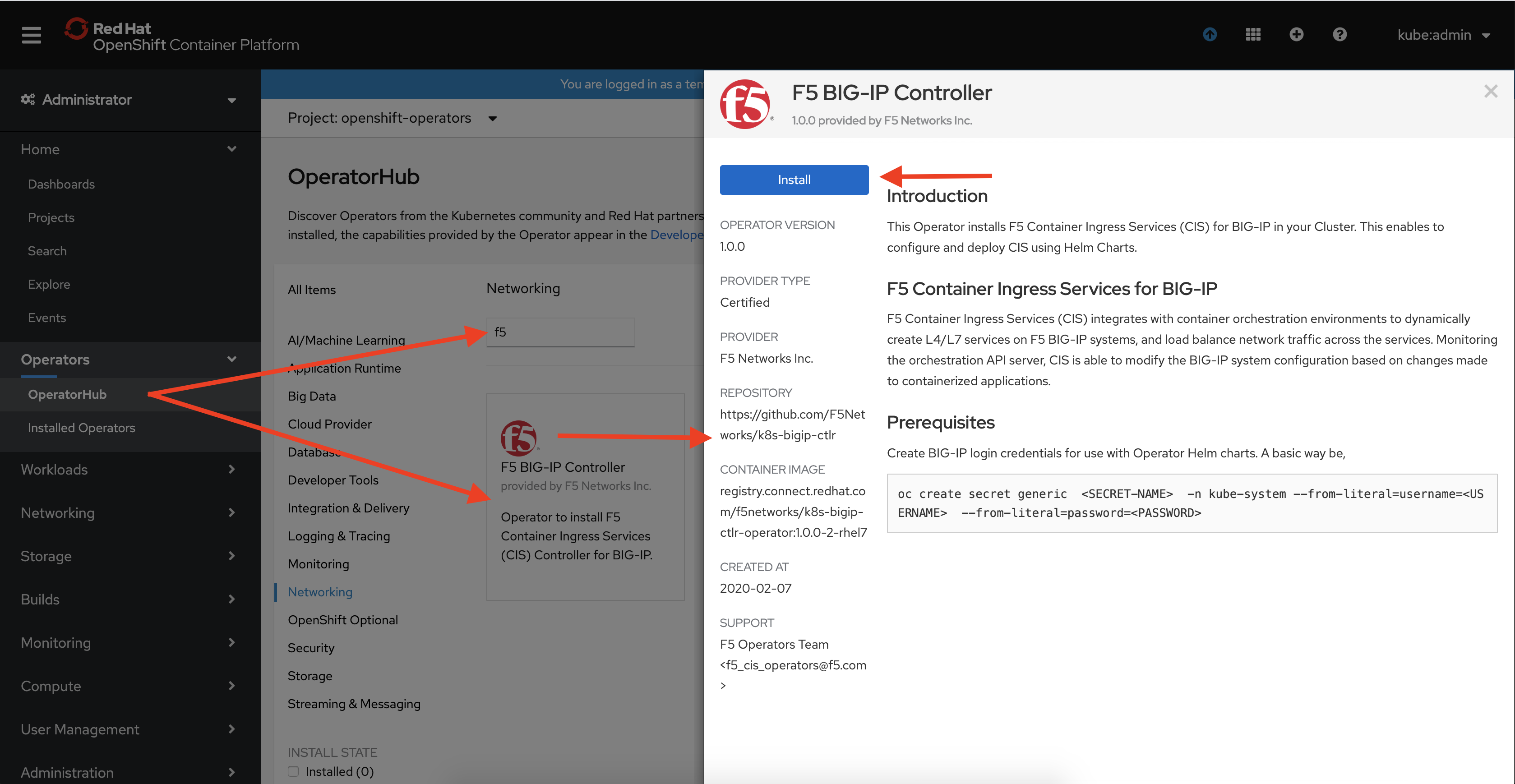
Click Install to go through the guided installation process.
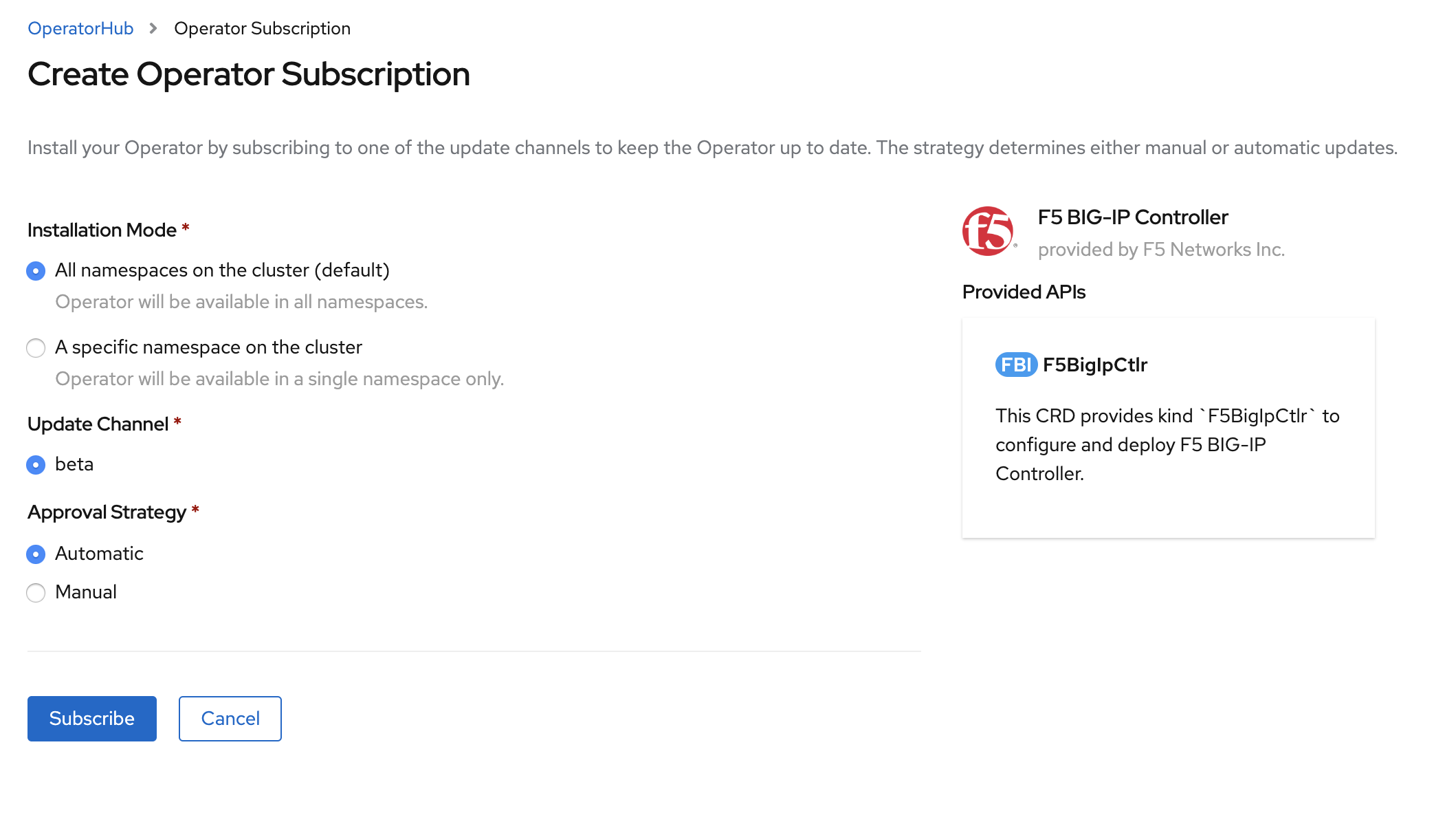
When Operator is Subscribed, Operator is installed based on approval strategy. The default approval strategy is Automatic.
- Manual: Requires administrator approval to install new updates.
- Automatic: When a new release is available, updated automatic.
Installing CIS Using Helm Charts
This is the simplest way to install CIS on an OpenShift cluster. Helm is a package manager for Kubernetes. Helm is Kubernetes version of YUM or APT. Helm deploys something called charts, which you can think of as a packaged application. It is a collection of all your versioned, pre-configured application resources which can be deployed as one unit.
Optionally, add BIG-IP credentials as K8S secrets.
For Openshift, use the following command:
oc create secret generic f5-bigip-ctlr-login -n kube-system --from-literal=username=admin --from-literal=password=<password>
Add the CIS chart repository in Helm using following command:
helm repo add f5-stable https://f5networks.github.io/charts/stable
Create values.yaml as shown below:
values.yaml¶1 2 3 4 5 6 7 8 9 10 11 12 13 14 15 16 17 18 19 20 21 22 23 24 25 26 27 28 29 30 31 32 33 34 35 36 37 38 39 40 41 42 43 44 45 46 47 48 49 50 51 52 53 54 55 56 57 58 59 60 61 62 63 64 65 66 67 68 69 70 71 72 73 74 75 76 77 78 79
bigip_login_secret: f5-bigip-ctlr-login
bigip_secret:
  create: false
  username:
  password:
rbac:
  create: true
serviceAccount:
  # Specifies whether a service account should be created
  create: true
  # The name of the service account to use.
  # If not set and create is true, a name is generated using the fullname template
  name: k8s-bigip-ctlr
 # This namespace is where the Controller lives;
namespace: kube-system
ingressClass:
  create: true
  ingressClassName: f5
  isDefaultIngressController: true
args:
  # See https://clouddocs.f5.com/containers/latest/userguide/config-parameters.html
  # NOTE: helm has difficulty with values using `-`; `_` are used for naming
  # and are replaced with `-` during rendering.
  # REQUIRED Params
  bigip_url: <ip_address-or-hostname>
  bigip_partition: <name_of_partition>
  # OPTIONAL PARAMS -- uncomment and provide values for those you wish to use.
  # verify_interval:
  # node-poll_interval:
  # log_level:
  # python_basedir: ~
  # VXLAN
  # openshift_sdn_name:
  # flannel_name:
  # KUBERNETES
  # default_ingress_ip:
  # kubeconfig:
  # namespaces: ["foo", "bar"]
  # namespace_label:
  # node_label_selector:
  # pool_member_type: nodeport
  # resolve_ingress_names:
  # running_in_cluster:
  # use_node_internal:
  # use_secrets:
  # insecure: true
  # custom-resource-mode: true
  # log-as3-response: true
  # gtm-bigip-password
  # gtm-bigip-url
  # gtm-bigip-username
  # ipam : true
image:
  # Use the tag to target a specific version of the Controller
  user: f5networks
  repo: k8s-bigip-ctlr
  pullPolicy: Always
version: latest
# affinity:
#   nodeAffinity:
#     requiredDuringSchedulingIgnoredDuringExecution:
#       nodeSelectorTerms:
#       - matchExpressions:
#         - key: kubernetes.io/arch
#           operator: Exists
# securityContext:
#   runAsUser: 1000
#   runAsGroup: 3000
#   fsGroup: 2000
# If you want to specify resources, uncomment the following
# limits_cpu: 100m
# limits_memory: 512Mi
# requests_cpu: 100m
# requests_memory: 512Mi
# Set podSecurityContext for Pod Security Admission and Pod Security Standards
# podSecurityContext:
#   runAsUser: 1000
#   runAsGroup: 1000
#   privileged: true
Installing Helm charts:
Install the Helm chart using the following command if BIG-IP credential secrets are created manually:
helm install -f values.yaml <new-chart-name> f5-stable/f5-bigip-ctlr
Install the Helm chart with
--skip crdsif BIG-IP credential secrets are created manually (without Custom Resource Definitions installations):helm install --skip-crds -f values.yaml <new-chart-name> f5-stable/f5-bigip-ctlr
If you want to create the BIG-IP credential secret with Helm charts, use the following command:
helm install --set bigip_secret.create="true" --set bigip_secret.username=$BIGIP_USERNAME --set bigip_secret.password=$BIGIP_PASSWORD -f values.yaml <new-chart-name> f5-stable/f5-bigip-ctlr
Note
For Kubernetes versions lower than 1.18, please use Helm chart version 0.0.14 as follows:
helm install --skip-crds -f values.yaml <new-chart-name> f5-stable/f5-bigip-ctlr --version 0.0.14.
Chart parameters
| Parameter | Required | Default | Description |
|---|---|---|---|
| bigip_login_secret | Optional | f5-bigip-ctlr-login | Secret that contains BIG-IP login credentials. |
| bigip_secret.create | Optional | false | Create Kubernetes secret using username and password. |
| bigip_secret.username | Optional | N/A | BIG-IP username to create the Kubernetes secret. |
| bigip_secret.password | Optional | N/A | BIG-IP password to create the Kubernetes secret. |
| args.bigip_url | Required | N/A | The management IP for your BIG-IP device. |
| args.bigip_partition | Required | f5-bigip-ctlr | BIG-IP partition the CIS Controller will manage. |
| args.namespaces | Optional | N/A | List of Kubernetes namespaces which CIS will monitor. |
| rbac.create | Optional | true | Create ClusterRole and ClusterRoleBinding. |
| serviceAccount.name | Optional | f5-bigip-ctlr- serviceaccount | Name of the ServiceAccount for CIS controller. |
| serviceAccount.create | Optional | true | Create service account for the CIS controller. |
| namespace | Optional | kube-system | Name of namespace CIS will use to create deployment and other resources. |
| image.user | Optional | f5networks | CIS Controller image repository username. |
| image.repo | Optional | k8s-bigip-ctlr | CIS Controller image repository name. |
| image.pullPolicy | Optional | Always | CIS Controller image pull policy. |
| image.pullSecrets | Optional | N/A | List of secrets of container registry to pull image. |
| version | Optional | latest | CIS Controller image tag. |
| nodeSelector | Optional | N/A | Dictionary of Node selector labels. |
| tolerations | Optional | N/A | Array of labels. |
| limits_cpu | Optional | 100m | CPU limits for the pod. |
| limits_memory | Optional | 512Mi | Memory limits for the pod. |
| requests_cpu | Optional | 100m | CPU request for the pod. |
| requests_memory | Optional | 512Mi | Memory request for the pod. |
| affinity | Optional | N/A | Dictionary of affinity. |
| securityContext | Optional | N/A | Dictionary of deployment securityContext. |
| podSecurityContext | Optional | N/A | Dictionary of pod securityContext. |
| ingressClass.ingressClassName | Optional | f5 | Name of ingress class. |
| ingressClass.isDefaultIngressController | Optional | false | CIS will monitor all the ingress resources if set true. |
| ingressClass.create | Optional | true | Create ingress class. |
Note
The parameters bigip_login_secret and bigip_secret are mutually exclusive. If both are defined in the values.yaml file, bigip_secret will be given priority.
Uninstalling Helm Chart
Run the following command to uninstall the chart.
helm uninstall <new-chart>
Creating VXLAN Tunnels on Openshift Cluster
This section is only required if you plan to use CIS in a ClusterIP Deployment. See ClusterIP for more information.
Log in to the BIG-IP and create a BIG-IP partition.
tmsh create auth partition <partition_name>
Create a VXLAN tunnel. In the example below, the tunnel name is fl-vxlan.
tmsh create net tunnels vxlan fl-vxlan port 8472 flooding-type none
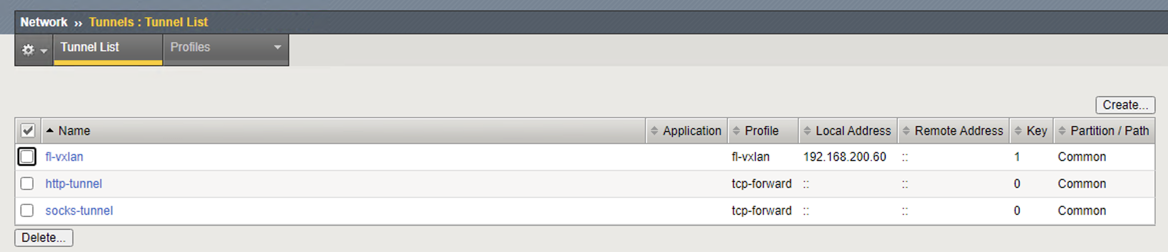
Create a VXLAN profile with an internal self IP.
tmsh create net tunnels tunnel fl-vxlan key 1 profile fl-vxlan local-address 192.168.200.91

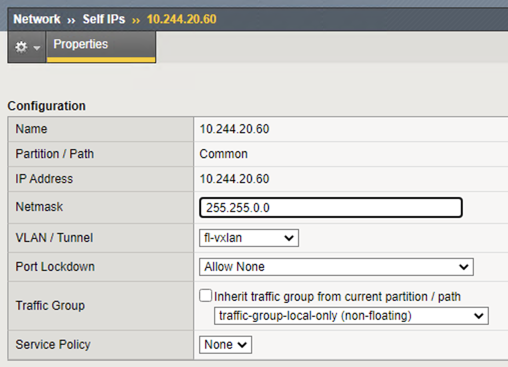
Create the VXLAN tunnel self IP.
tmsh create net self 10.244.20.91 address 10.244.20.91/255.255.0.0 allow-service none vlan fl-vxlan
Sharding the OpenShift Default Ingress Controller
You can restrict OpenShift’s default Ingress Controller from servicing routes with specific labels using either namespace selectors or route selectors as follows:
- Run the following cmd to edit the default router.
oc edit ingresscontroller -n openshift-ingress-operator default
- Add the following route selector for default router in OpenShift:
spec:
  routeSelector:
    matchExpressions:
    - key: f5type
       operator: NotIn
       values:
       - systest
- Add the following namespace selector for default router in OpenShift:
spec:
namespaceSelector:
   matchExpressions:
   - key: environment
      operator: NotIn
      values:
      - dev
Note
- Both the label key and its corresponding label value must match the ones specified in the CIS Controller.
- OpenShift default router may not immediately clear the route status for routes. If you recreate the route, or create a new route, you can see that it’s not processed by OpenShift’s default Ingress Router.
OpenShift Route Resources
Note
You can use OpenShift Route resources in an existing deployment once you replace the OpenShift F5 Router with the BIG-IP Controller.
Supported Route Configurations
Important
The CIS supports a single path-based route for TLS re-encryption. Multiple path-based routes are not currently supported.
| Type | Client Connection Encrypted | Server Connection Encrypted | Path Support | SSL Termination on BIG-IP | Description |
|---|---|---|---|---|---|
| Unsecured | No | No | Yes | No | The BIG-IP system forwards unsecured traffic from the client to the endpoint. |
| Edge Terminated | Yes | No | Yes | Yes | The Controller maintains a new client SSL profile on the BIG-IP system based on the client certificate and key from the Route resource.
|
| Passthrough Terminated | Yes | Yes | No | No | The BIG-IP system uses an iRule to select the destination pool based on SNI and forward the re-encrypted traffic. |
| Re-encrypt Terminated | Yes | Yes | Yes | Yes | The Controller maintains a new BIG-IP client SSL profile based on the client certificate and key from the Route resource. The Controller maintains a new BIG-IP server SSL profile based on the server CA certificate from the Route resource for re-encrypting the traffic. The BIG-IP system uses an iRule to select the destination pool based on SNI and forward the re-encrypted traffic. |
Supported Route Annotations
| Annotation | Type | Required | Description | Default | Allowed Values | |
|---|---|---|---|---|---|---|
| virtual-server.f5.com/balance | string | Optional | Sets the load balancing mode. | round-robin | Any supported load balancing algorithm | |
| virtual-server.f5.com/clientssl | string | Optional | The name of a pre-configured client ssl profile on the BIG-IP system. The controller uses this profile instead of the certificate and key within the Route’s configuration. | N/A | ||
| virtual-server.f5.com/serverssl | string | Optional | The name of a pre-configured server ssl profile on the BIG-IP system. The controller uses this profile instead of the certificate within the Route’s configuration. | N/A | ||
| virtual-server.f5.com/health | JSON object | Optional | Defines a health monitor for the Route resource. | N/A | ||
| path | string | Required | The path for the Service specified in the Route resource. | N/A | ||
| interval | integer | Required | The interval at which to check the health of the virtual server. | N/A | ||
| timeout | integer | Required | Number of seconds before the check times out. | N/A | ||
| send | string | Required | The send string to set in the health monitor. | N/A | ||
| recv | string | Optional | String or RegEx pattern to match in first 5,120 bytes of backend response. | N/A | ||
| type | string | Optional | Specify the type (http or https) of Health monitor. | N/A | ||
| virtual-server.f5.com/secure-serverssl | boolean | Optional | Specify to validate the server-side SSL certificate of re-encrypt terminated routes. | false | “true”, “false” | |
| virtual-server.f5.com/rewrite-app-root | string | Optional | Root path redirection for the application. | N/A | ||
| virtual-server.f5.com/rewrite-target-url | string | Optional | URL host, path, or host and path to be rewritten. | N/A | ||
| virtual-server.f5.com/allow-source-range | string | Optional | Comma-separated list of CIDR addresses to allow inbound to Route services. | N/A | Comma-separated, CIDR formatted, IP addresses. ex. 1.2.3.4/32,2.2.2.0/24 |
|
| virtual-server.f5.com/waf | string | Optional | The name of a pre-configured WAF Policy on the BIG-IP system. | N/A | ||
| virtual-server.f5.com/pod-concurrent- connections | string | Optional | Sets the concurrent connections allowed for a pod. | N/A | Any integer value | |
Note
The pod-concurrent-connections annotation is only available for NextGen routes.
Important
For edge (client) termination, a Route must include either the certificate/key literal information in the Route Spec, or the clientssl annotation. For re-encrypt (server) termination, a Route must include either the destinationCaCertificate literal information in the Route Spec, or the serverssl annotation, in addition to the edge rules listed previously. If you want to use the configuration parameters default-clientssl or default-serverssl profiles for a Route, then specify those profile names in the Route annotations in addition to the controller configuration.
Note
To provide feedback on Container Ingress Services or this documentation, please file a GitHub Issue.